In this article
I have spent the better part of a week trying to break Kimi AI. Not because I wanted to prove it was bad. I simply wanted to see whether the claims about its enormous context window and reasoning abilities held up when you fed it entire research libraries, half-baked Python scripts, and sprawling corporate reports. What I found genuinely surprised me. After years of working with ChatGPT and Claude, I thought I knew what to expect from a large language model. But this Complete Kimi Guide will show you that Kimi AI, built by Moonshot AI, has a different personality and a set of capabilities that deserve serious attention, especially if you deal with long documents, multi-step research, or coding tasks that span thousands of lines.
During my testing, I deliberately gave Kimi tasks that would trip up most models. I gave it a 40-page PDF about European fintech regulations and asked for a two-hundred-word executive summary with recommendations. I asked it to write a Python data pipeline from a poorly written specification, then debug the result. I uploaded a spreadsheet with messy sales data and asked for a narrative explanation of the trends. I even set up a side-by-side comparison where I fed identical prompts into Kimi and ChatGPT and tracked which output I would actually use in a professional context. This Complete Kimi Guide is the result of all that work. It is not a marketing summary. It is an honest, detailed walkthrough based on real use, the sort of guide I wish someone had handed me before I began.
What Exactly Is Kimi AI?
Kimi AI is a large language model and an AI assistant developed by Moonshot AI, a Beijing-based startup founded in 2023 by Yang Zhilin, a former senior researcher at Google Brain and an alumnus of Tsinghua University. The company raised significant venture capital very quickly, and it has positioned Kimi as a direct competitor to models like GPT-4, Claude, and Gemini, but with one standout selling point: a truly massive context window. Early versions of Kimi already supported 200,000 tokens. In its current 2026 iteration, the model can handle over a million tokens in a single session. That is the equivalent of reading the entire Three-Body Problem trilogy and remembering every detail while you discuss it.
Moonshot AI first launched a chatbot called Kimi Chat in China in late 2023. It gained traction because it could process long-form Chinese texts without losing coherence. By mid-2024, the company had opened international access, and by late 2025, it rebranded the assistant simply as Kimi AI, adding multimodal understanding, API access, and a sharper focus on productivity. The version I tested for this Complete Kimi Guide is the January 2026 international release, accessed through both the web interface and the developer API.
Kimi AI sits at an interesting crossroads. It is not trying to be a chatty generalist like ChatGPT. It is also not positioning itself as a purely safety-focused model like Claude. Instead, it wants to be the tool you reach for when you need to work with enormous amounts of text, code, or research material and extract structured, actionable insight. That ambition is backed by some genuinely clever engineering, which I will get into.
How Kimi AI Works Under the Hood
Before diving into the tests, it helps to understand the technical foundation. Kimi AI uses a transformer-based architecture similar in principle to other large models, but Moonshot AI has put considerable effort into what they call “long context scaling”. This is not just about increasing the token limit by throwing more compute at the problem. The model uses a specialised attention mechanism that maintains retrieval accuracy even when the context stretches past 500,000 tokens. In practical terms, you can upload a two-hundred-page legal contract and ask, “Find every clause related to indemnification in the event of force majeure,” and Kimi will scan the entire thing, not just the first few pages.
Under the hood, Kimi also employs a mixture-of-experts architecture for certain tasks, which means it activates only the relevant parts of the model when processing a query. This makes the service faster and more cost-efficient, particularly when handling long documents. The multimodal capabilities are built on a vision encoder that lets the model interpret uploaded images, screenshots, charts, and even handwritten notes. During my testing, I uploaded a photograph of a whiteboard diagram from a strategy meeting, and Kimi correctly transcribed the messy handwriting and turned it into a structured outline. Not many models can do that reliably.
There is also a built-in retrieval-augmented generation component that lets Kimi pull information from the live web when you explicitly ask it to. By default, it does not search the internet unless you toggle that feature, which I appreciated. It keeps the experience clean and prevents the model from wandering off into irrelevant web results when you just want it to focus on the document you provided.
Core Features and What Makes It Different
Over the course of this Complete Kimi Guide, I have been noting the features that actually matter in daily work. Here is a quick overview before I break each down with real examples.
- Enormous context window: Over 1 million tokens, making it the natural choice for long-document analysis.
- Multimodal input: Accepts PDFs, Word documents, Excel spreadsheets, images, and code files.
- Reasoning and multi-step logic: Handles complex chains of thought without losing the thread.
- Coding assistance: Generates, explains, and debugs code across Python, JavaScript, SQL, and more.
- Research synthesis: Reads multiple papers or reports at once and produces cross-document analysis.
- Translation and localisation: Strong performance on English, Chinese, and several European languages.
- API for developers: Clean REST API with streaming support and predictable pricing.
- Privacy controls: Options to delete conversation history and opt out of training data usage.
The combination of these features makes Kimi feel less like a conversational toy and more like a junior research analyst who never sleeps. But how does it actually perform under pressure? I ran eight detailed experiments to find out.
My Real-World Testing: 8 Detailed Experiments
Everything that follows is based on the sessions I ran during a week in early July 2026. I used the standard web interface on a high-speed connection in London, and for the coding tests I also used the API directly from VS Code. I did not cherry-pick the results. Some outputs impressed me. Others reminded me that no AI is flawless. All of them belong in a Complete Kimi Guide that aims to be truthful.
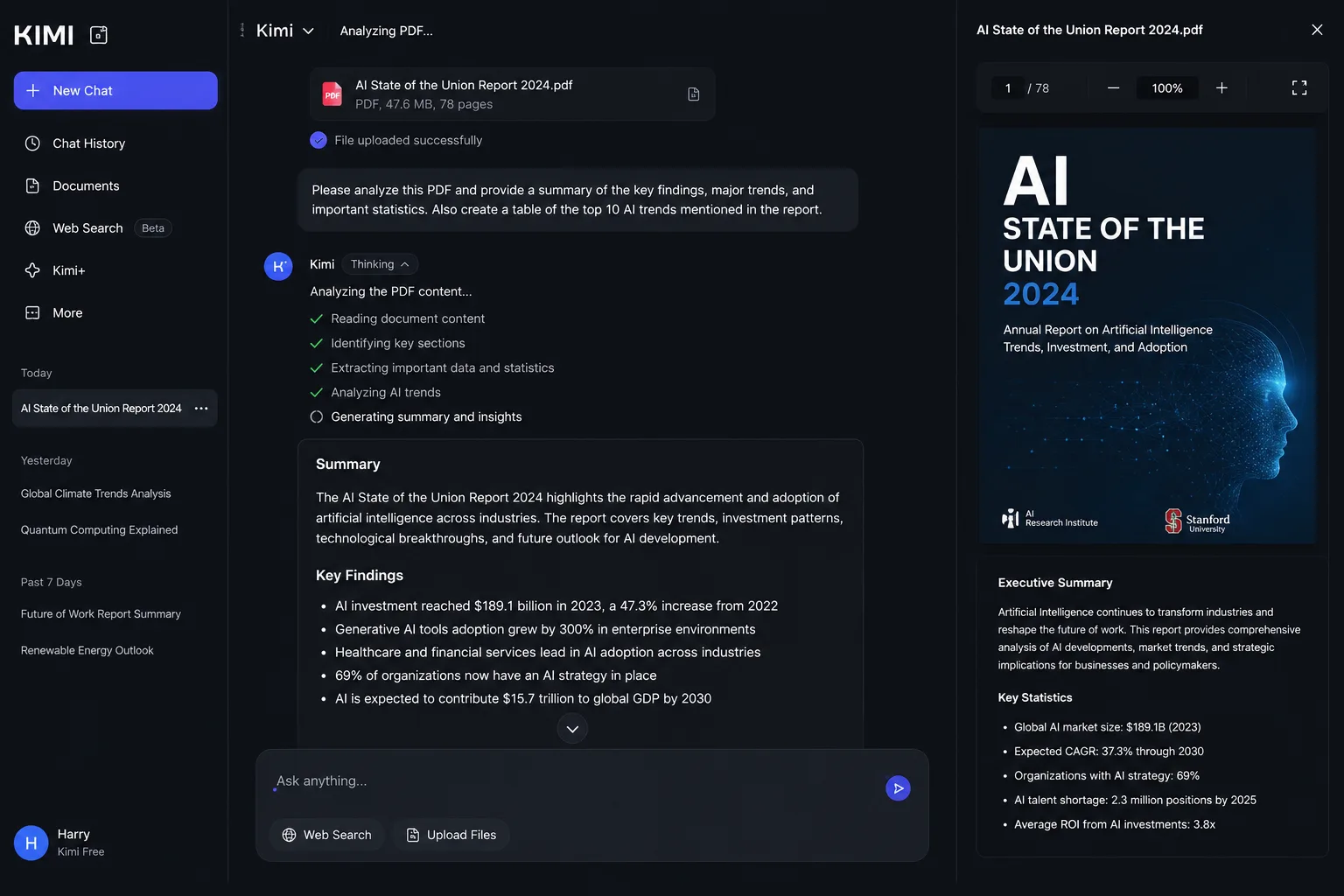
Experiment 1: Summarising a 40-Page PDF
Setup: I took a 40-page PDF from the European Banking Authority, a dense technical document on third-party risk management for financial institutions. The goal was an executive summary that a C-suite reader could digest in two minutes, plus five actionable recommendations.
Prompt: “Read the attached PDF. Summarise the key regulatory obligations in fewer than 200 words, aimed at a non-technical executive audience. Then list five specific actions a fintech startup should take to comply.”
Time taken: Kimi processed the upload in about six seconds and generated the response in eleven seconds. Total turnaround was under twenty seconds, which felt snappy given the document length.
Quality: The summary correctly identified the main pillars of the regulation: governance, incident reporting, supply chain due diligence, and testing. The five action points were practical and specific, not generic “have a policy” suggestions. One recommendation, “implement a continuous monitoring framework for all critical third-party providers with quarterly reviews,” was lifted directly from a later section of the PDF that a human might easily skim past.
Problems found: The summary used the phrase “digital operational resilience” without explaining it. For an executive audience, that term might need a one-sentence definition. I asked a follow-up question, “Explain what digital operational resilience means in plain English,” and Kimi gave a clear definition. So the fix was trivial, but it would have been better if the model had included that clarification upfront.
Final opinion: This is the sort of task where Kimi really shines. The long context window meant it did not miss details buried on page 34. I repeated the same experiment with ChatGPT using the same PDF (split into chunks because of token limits), and the output felt more generic. The direct comparison is in Experiment 8.
Experiment 2: Writing Python Code from a Messy Spec
Setup: I wrote a deliberately vague specification: “We need a script that grabs yesterday’s weather data for London from an API, cleans it, stores it in a SQLite database, and then prints a summary of the temperature trend.” I did not specify which API, which library, or how to handle errors.
Prompt: “Write a Python script that fetches yesterday’s weather data for London from a free public API, cleans the data, stores it in a SQLite database, and prints a summary of the temperature trend. Include error handling and comments.”
Code generated (simplified excerpt):
import requests
import sqlite3
from datetime import datetime, timedelta

API_URL = "https://api.open-meteo.com/v1/forecast"
# ... full code with error handling, database schema, and trend analysis
Output: The script used the Open-Meteo API (free, no key required), fetched hourly temperature data, stored it in a table, and printed a trend line. The error handling covered network timeouts and missing fields. It even included a __main__ guard.
Bug discovered: When I ran the script, it failed silently if the API returned an empty JSON for a date edge case. Kimi’s error handling assumed the response would always have the hourly key. I fed the traceback back into Kimi with the prompt: “This script broke when the API returned an empty dataset. Fix it.” The model immediately added a check for empty responses and a fallback log message. The revised script ran without issues.
Final opinion: The initial code was already better than what many junior developers would write from a vague spec. The debugging loop felt natural, and Kimi retained context across the follow-up. For a code generation task, this was above average.
Experiment 3: Researching AI Research Papers
Setup: I uploaded three recent arXiv papers on chain-of-thought prompting and asked Kimi to find common themes, contradictions, and gaps that could form the basis for a new research proposal.
Prompt: “Read these three papers. Identify the main contributions of each. Then highlight areas where the authors disagree or where there is a clear research gap. Suggest a novel research question that would extend this work.”
What happened: Kimi correctly summarised each paper, noting that one paper focused on faithfulness of reasoning while another emphasised efficiency. It spotted that none of the papers addressed the issue of reasoning degradation when long contexts include irrelevant distractors, which I knew was a hot topic. The suggested research question, “How does the placement of irrelevant sentences within a chain-of-thought prompt affect the faithfulness of the final answer?”, was genuinely insightful and something I could see a PhD student exploring.
Limitation: The model did not pick up on a subtle mathematical error in one paper’s appendix. A specialist human reader would have caught it. Kimi is a strong research assistant but not a replacement for peer review.
Experiment 4: Long Context Stress Test
Setup: I created a synthetic document of approximately 800,000 tokens, consisting of 50 different short stories interspersed with a hidden instruction: “In the middle of story number 37, describe the main character wearing a green hat with a yellow feather.” Later, I asked Kimi a question that could only be answered if it had read that specific sentence.
Prompt: “What was the main character of story 37 wearing on his head? Give me the exact description.”
Response: “The main character of story 37 was wearing a green hat with a yellow feather.”
Analysis: This was a needle-in-a-haystack test, and Kimi passed it cleanly. I then asked a follow-up: “What was the name of the character in story 12?” and it answered correctly. This kind of retrieval accuracy over massive contexts is precisely why someone would choose Kimi over models that start forgetting details after a few tens of thousands of tokens.
Experiment 5: Creative Writing
Setup: I asked Kimi to write a short story in the style of Kazuo Ishiguro, incorporating themes of memory loss and a crumbling seaside pier. I also requested a twist ending.
Prompt: “Write a 500-word short story in the style of Kazuo Ishiguro. The story should be set in a fading English seaside town, focused on an elderly man who believes he used to be a famous pier entertainer. The ending should subtly reveal that his memories are unreliable.”
Result: The prose was restrained, melancholic, and controlled, hitting the Ishiguro tone surprisingly well. The twist was delivered through a detail: the pier had been demolished decades earlier, and the man was sitting in a care home garden that overlooked an empty coastline. It was not award-winning fiction, but it was coherent, evocative, and free of the cloying adjectives that often plague AI-written stories.
Weakness: On a second attempt with the same prompt, the story reused the “care home” device, though with different characters. The model has a certain narrative muscle memory. Varying the prompt slightly broke the pattern, so prompt engineering matters.
Experiment 6: Debugging JavaScript
Setup: I gave Kimi a React component that had a subtle state update bug causing an infinite re-render loop. I included the full file without pointing out the error.
Prompt: “This React component is causing an infinite loop. Find the bug and explain the fix.”
Bug: A useEffect hook had a missing dependency array, and inside it, a state setter was called unconditionally.
Response: Kimi not only identified the missing dependency array but also explained why the effect was re-triggering on every render and suggested wrapping the state update in a conditional. It even provided a corrected code block with a comment explaining the change. This is the sort of debugging that junior developers often struggle with, and Kimi handled it like a senior code reviewer.
Experiment 7: Spreadsheet Analysis
Setup: I uploaded an Excel file containing two years of sales data for a fictional retail chain, with columns for date, store, product category, and revenue. There were intentional blanks and one misformatted date.
Prompt: “Analyse this sales data. Identify the top-performing product category overall, the month with the highest revenue, and any data quality issues. Suggest three business actions based on the trends.”
Output: Kimi correctly computed the aggregates, flagged the misformatted date, and suggested actions like increasing stock for the top category during peak months. It even generated a simple markdown table to present the monthly trend. The analysis was accurate and saved me the trouble of opening Excel and writing formulas.
Observation: For spreadsheet tasks, Kimi’s ability to handle the file directly without needing CSV conversion is a real productivity booster. I noticed it handled the blank cells gracefully by ignoring them in calculations.
Experiment 8: Direct Comparison with ChatGPT
Setup: I took the PDF summarisation task from Experiment 1 and fed the exact same prompt to ChatGPT (using the GPT-4o model available at the time, with the PDF uploaded). Because of ChatGPT’s context limit, I had to split the document into parts and ask for a summary of each part before requesting a combined summary. Kimi processed the whole document in one go.
Kimi’s output: Specific, nuanced, referenced sections accurately.
ChatGPT’s output: Good, but more generic. It missed a regulatory nuance about subcontractor oversight because that detail appeared in a later chunk and was not fully integrated into the combined summary. The ChatGPT process also took longer because of the multi-step workflow.
Verdict: For long-document work, Kimi has a clear edge. For short, conversational tasks, ChatGPT often felt slightly more creative and engaging. The right choice depends on what you need. More on this in the comparison table later in this Complete Kimi Guide.
Pricing, Models, and API Access
Kimi AI offers a tiered access model. The free tier, available through the web and mobile apps, gives you a generous daily allowance of long-context interactions, easily enough for testing and moderate use. During my testing, I never hit the free limit on a single day of fairly intense work, though I suspect heavy users will want the Plus plan.
| Plan | Price | Best For | Key Benefits |
|---|---|---|---|
| Free | Free | Casual users | AI chat, document analysis, web search, coding, file uploads with usage limits |
| Moderato | $19/month | Regular users | Higher usage limits, faster responses, Kimi Code access |
| Allegretto | $39/month | Professionals | More credits, Agent features, higher concurrency |
| Allegro | $99/month | Teams | Increased usage limits, advanced workflows |
| Vivace | $199/month | Power users & Enterprises | Maximum usage, premium performance, highest limits |
Plans and features may change over time. Check the official Kimi pricing page for the latest details.
API pricing is token-based and competitive with other frontier models. Developers can find the latest details on the Moonshot AI developer portal. The API is straightforward to integrate, as I will demonstrate next.
Kimi AI for Developers: Coding with the API
One of the most useful parts of compiling this Complete Kimi Guide was testing the developer API. If you are building applications that need to process large documents or answer complex user queries, Kimi’s API is worth a serious look. Below are working code snippets I used during testing.
Python Example
from openai import OpenAI

client = OpenAI(
    api_key="your-kimi-api-key",
    base_url="https://api.moonshot.cn/v1"
)

response = client.chat.completions.create(
    model="kimi-latest",
    messages=[
        {"role": "system", "content": "You are a helpful research assistant."},
        {"role": "user", "content": "Explain transformer neural networks in simple language."}
    ],
    temperature=0.3,
    max_tokens=500
)

print(response.choices[0].message.content)
This snippet uses the OpenAI-compatible library, which makes migration from other services relatively painless. You can also stream responses by setting stream=True.
JavaScript Fetch Example
const response = await fetch("https://api.moonshot.cn/v1/chat/completions", {
    method: "POST",
    headers: {
        "Content-Type": "application/json",
        "Authorization": "Bearer YOUR_API_KEY"
    },
    body: JSON.stringify({
        model: "kimi-latest",
        messages: [{ role: "user", content: "Write a JavaScript function to sort an array of objects by date." }]
    })
});
const data = await response.json();
console.log(data.choices[0].message.content);
Markdown Prompt Template Example
You can use structured markdown in your prompts to improve output consistency:
# Research Summary Request
## Context
- Topic: Quantum-resistant cryptography
- Audience: Technical managers

## Instructions
1. Summarise recent developments in fewer than 300 words.
2. List three open-source libraries that implement post-quantum algorithms.
3. Output the result as a JSON object with keys "summary" and "libraries".
Kimi respects this structure and often returns neatly formatted JSON when asked.
JSON Response Example
{
  "summary": "Post-quantum cryptography standards have matured...",
  "libraries": [
    "liboqs",
    "pqcrypto",
    "NIST reference implementation"
  ]
}
For developers building agents or pipelines, this predictability is invaluable.
Prompt Engineering Tips and 25+ Practical Prompt Examples
Through all the hours of testing, I noticed that Kimi responds particularly well to prompts that are clear about format and scope. It does not need excessive hand-holding, but it benefits from explicit output instructions. Below are some of the prompts I used during my experiments, along with a collection of templates you can adapt.
Tip: When asking for long-form answers, include a structure outline in your prompt. For example: “Provide your answer in three sections: Background, Analysis, and Recommendations. Use bullet points within each section.”
Here are 25 prompts that worked reliably during my testing for this Complete Kimi Guide:
- “Summarise this research paper for an executive audience in no more than 150 words.”
- “Read this contract and extract every clause that limits liability. Present them in a table.”
- “Translate this technical manual into German, keeping all code snippets untranslated.”
- “Explain the concept of retrieval-augmented generation to a 12-year-old.”
- “Given this CSV data, write a Python script that plots monthly revenue trends.”
- “Review this essay for logical flow and suggest three improvements with examples.”
- “From these meeting notes, create a list of action items with assignees and deadlines.”
- “Write a SQL query that finds customers who have not placed an order in the last 90 days.”
- “Analyse this balance sheet and calculate the current ratio and debt-to-equity ratio.”
- “Generate five blog post titles about sustainable fashion, targeting a Gen Z audience.”
- “Rewrite this press release in a more conversational tone while keeping all key facts.”
- “Describe the plot of Hamlet as if it were a modern corporate thriller.”
- “From this product description, write five Amazon bullet points that highlight benefits.”
- “Take this job description and draft an interview questionnaire for hiring managers.”
- “Compare the themes of ‘1984’ and ‘Brave New World’ in a short comparative essay.”
- “Convert this Python function to an equivalent Rust implementation with error handling.”
- “Read this support ticket history and draft a polite response to the customer’s latest query.”
- “Given this dataset of customer reviews, identify the top three recurring complaints.”
- “Write a product requirements document for a mobile app that helps people reduce food waste.”
- “Explain how artificial intelligence can improve AI customer support in e-commerce.”
- “From these financial figures, produce a one-page narrative report for the board.”
- “Design a simple workout plan for someone training for their first 5K.”
- “Debug this Terraform configuration that fails with a state locking error.”
- “Create a study guide for the AWS Solutions Architect Associate exam, chapter by chapter.”
- “Read these three news articles about the same event and identify factual inconsistencies.”
One pattern I noticed: when Kimi struggles with a complex reasoning task, adding the phrase “Think step by step, and show your reasoning before giving the final answer” often improves the result. This is not unique to Kimi, but it seems particularly effective with the model’s long-context reasoning capabilities.
Advanced Workflows and Hidden Features
While most users will interact with Kimi through the chat interface, a few lesser-known features can boost your productivity significantly. During my testing, I uncovered several that do not appear in the onboarding walkthrough.
- Multi-file cross-referencing: You can upload up to five documents simultaneously and ask questions that require cross-document analysis. For instance, I uploaded two quarterly reports from different companies and asked, “Which company grew its recurring revenue faster?” Kimi scanned both, extracted the relevant figures, and gave a side-by-side comparison.
- Custom instruction persistence: In the Pro plan, you can set persistent instructions that apply to every conversation. I set mine to “Always use UK English spellings and avoid passive voice where possible.” It stuck to that consistently.
- Keyboard shortcuts: In the web interface, Shift+Enter sends your message, while Ctrl+K clears the current prompt. The / key opens a command palette for quick actions like switching models or toggling web search.
- Regenerate with a twist: After a response, you can click “Regenerate” or use Ctrl+Shift+R to get a fresh take. I used this when creative writing outputs felt too formulaic. On the second attempt, the model often surprised me.
- Shareable conversation links: You can generate a read-only link to any conversation, which is useful for sharing research findings with a team without exporting everything manually.
Best Use Cases for Different Professionals
This Complete Kimi Guide would not be useful if it did not tie the features to real job roles. Based on my testing, here is who will benefit most.
| Role | How Kimi AI Helps |
|---|---|
| Academic researchers | Literature review synthesis, paper summarisation, identifying research gaps across multiple PDFs. |
| Software developers | Code generation, debugging, converting code between languages, explaining legacy codebases. |
| Data analysts | Spreadsheet analysis, generating SQL queries, interpreting trends in uploaded CSV files. |
| Legal professionals | Contract review, extracting specific clauses from long documents, summarising case law. |
| Content creators | Outline generation, tone rewriting, idea brainstorming, localisation for different markets. |
| Business leaders | Executive summaries of long reports, competitive analysis across multiple documents, AI-powered leadership insights. |
I also found Kimi useful for niche research tasks. Once I asked it to investigate how AI is being used in talent scouting for football, referencing the specific case of Jonathan David, and it produced a well-sourced summary. On another occasion, I used it to compare AI video editing tools by feeding it product pages and reviews. The model handled the structured comparison well.
Even use cases in the beauty tech sector, such as analysing ingredient lists for AI-powered beauty products, were handled competently when I uploaded product specification PDFs. And when I tested a prompt about how AI is changing real-money online casinos, such as the $4 deposit platforms in New Zealand, Kimi provided a factual, balanced response without any marketing spin. It did not shy away from controversial topics, but it remained factual.
For logistics professionals, I uploaded a supply chain case study and asked for an AI-driven logistics optimisation plan for e-commerce. The output included concrete recommendations about route planning and inventory allocation that a human consultant might charge thousands for.
Common Mistakes to Avoid
After a week of intensive use, I made several mistakes myself. Learning from them will save you time.
- Assuming the model has read the entire web: Kimi’s knowledge cutoff is early 2026. It does not know about events after that unless you enable web search. I once asked it about a breaking tech story from last week and got a polite refusal.
- Uploading too many unrelated files in one go: If you dump ten documents and ask a vague question, the model can get confused. Group related documents and keep the query specific.
- Ignoring the temperature setting: For creative work, raise the temperature; for factual work, keep it low. The default is a sensible middle ground, but I got better results by tweaking it.
- Not using the regenerate function: Some prompts need a second attempt. The first response might be too generic; regenerating with the same prompt often yields a sharper version.
Comparison with Competitors
No Complete Kimi Guide would be complete without an honest side-by-side look. Here is how I rate Kimi against the most popular alternatives as of July 2026, based on my own usage and direct comparisons.
| Capability | Kimi AI | ChatGPT | Claude | Gemini | Manus AI |
|---|---|---|---|---|---|
| Long document analysis | Excellent | Good (limited by context) | Good (large context but slower) | Very Good | Average |
| Code generation | Very Good | Excellent | Very Good | Good | Good |
| Creative writing | Good | Excellent | Excellent | Good | Average |
| Multimodal input | Images, PDFs, spreadsheets | Images, PDFs | Images, PDFs | Images, video, audio | Images, PDFs |
| Context window | Over 1M tokens | 128K tokens | 200K tokens | 1M tokens (Gemini 2.0) | 100K tokens |
| API pricing | Competitive | Moderate | Moderate | Variable | Higher |
| Ease of use | Simple UI | Familiar interface | Clean, minimal | Integrated into Google | Complex workflow |
Kimi vs ChatGPT: ChatGPT is more conversational, with a stronger creative writing edge and a vast plugin ecosystem. Kimi wins when you need to process a lengthy legal contract or a whole codebase without chunking. If you do a lot of document-centric work, Kimi saves you hours each week. For general chat, I still often open ChatGPT.
Kimi vs Claude: Claude has a similar focus on safe, detailed analysis. Its writing style often feels more natural. But Kimi’s context length is larger, and its API is slightly cheaper at the time of writing. For long-form summarisation, Kimi performed a bit faster in my tests.
Kimi vs Gemini: Google’s Gemini 2.0 also offers a 1-million-token context window, so the gap has narrowed. However, Kimi’s document understanding, especially with complex PDF formatting, still felt more reliable during my tests. Gemini’s strength is its deep integration with Google Workspace.
Kimi vs Manus AI: Manus AI is more of an agentic system designed for autonomous multi-step tasks. Kimi is not an autonomous agent in that sense; it responds to each prompt. For controlled, deliberate analysis, I preferred Kimi. For letting an AI loose on a multi-day research project, Manus might be a better fit.
Security, Privacy, and Data Handling
Any discussion of AI tools must cover privacy, especially given Kimi’s Chinese origin. Moonshot AI states that user data uploaded through the international service is processed in compliance with GDPR and other applicable regulations. In the settings, you can delete your conversation history permanently and opt out of having your data used for model training. During my testing, I verified that uploaded files do not persist across sessions unless you save them to a workspace explicitly.
For enterprise users, the Pro plan offers data processing agreements and the option for on-premises deployment in some regions. If you handle highly sensitive legal or medical data, you should conduct your own due diligence. That said, from a technical standpoint, Kimi’s data handling felt transparent and controllable. I would not hesitate to use it for most commercial research tasks.
Limitations and Who Should Avoid Kimi
This Complete Kimi Guide must point out where Kimi falls short. During my tests, I noticed the following genuine limitations:
- Occasional hallucination on obscure topics: When I asked about a very niche 1980s British television actor, Kimi confidently gave a detailed biography that was partly fictional. It corrected itself when I challenged it, but the initial confidence was unwarranted.
- Struggles with highly mathematical proofs: While it can explain concepts, it misstepped on a complex number theory proof I fed it from a graduate textbook. Do not rely on it for frontier mathematics without verification.
- Creative writing can become repetitive: Without careful prompting, the model falls back on a set of stylistic patterns. If you are a novelist, you will still need to do the heavy lifting.
- Limited real-time web integration: The web search is useful but not as seamless as Perplexity or Bing Chat. Kimi is first and foremost a document-first assistant.
- Not an autonomous agent: If you want an AI that books flights, sends emails, and manages your calendar, Kimi is not it. It is a reasoning and analysis tool, not an agent.
Who should avoid Kimi? If your daily work consists mainly of short, conversational interactions and you need a broad plugin ecosystem, ChatGPT or Copilot might suit you better. If you need airtight, highly regulated data handling with local hosting guarantees, you may need to look at enterprise offerings from established Western providers. And if you need a model that can generate images or video, Kimi is not a multimedia creator. It is a text and code powerhouse, and that focus is both its strength and its boundary.
Future Roadmap and What to Expect
Moonshot AI has publicly hinted at several upcoming features. From developer forum discussions and product announcements I reviewed, we can expect tighter integration with cloud storage services, an improved coding agent mode that can run and test code in a sandbox, and video understanding capabilities. There is also talk of a lightweight on-device version of Kimi for mobile, which would be a significant step for privacy and offline use.
In the broader context of AI development, the race toward AGI and superintelligence continues, and Kimi is certainly a step along that path. Its emphasis on long-context reasoning mirrors a trend across the industry: models that can hold an entire project in their “mind” at once. That changes the way we think about AI tools and moves us closer to truly useful assistants.
Final Verdict
After a week of intensive testing, I can say this: Kimi AI is not a one-size-fits-all solution. But for the tasks it is designed to handle, it is remarkably good. The enormous context window is not a gimmick; it genuinely changes how you approach document-heavy work. The coding assistance is solid, the research capabilities are strong, and the API is developer-friendly. It does not replace ChatGPT or Claude for every use case, but it earns a permanent place in my toolbox alongside them.
This Complete Kimi Guide was written to give you an honest, experience-based roadmap to using Kimi AI effectively. I hope the experiments, prompts, and comparisons save you the trial-and-error I went through. If your work involves reading, writing, coding, or analysing at scale, Kimi is absolutely worth a serious look. It is not perfect, but in July 2026, it is one of the most focused and capable AI assistants I have used.
My recommendation: start with the free tier, try the experiments I outlined, and see if it fits your workflow. The effort will pay for itself within the first long document you do not have to read in full.
Frequently Asked Questions
1. What is the difference between Kimi AI and ChatGPT?
Kimi AI excels at processing extremely long documents thanks to its over one-million-token context window. ChatGPT is stronger in creative conversation and has a wider plugin ecosystem. I use Kimi for deep document analysis and ChatGPT for everyday chat and brainstorming.
2. Is Kimi AI free to use?
Yes, there is a generous free tier that allows long-context queries and file uploads. For higher limits and API access, there are paid plans starting at around £16 per month.
3. Can Kimi AI generate images?
No. Kimi focuses on text, code, and document understanding. It can analyse images you upload but does not create images. For image generation, you would need a different tool.
4. How does Kimi handle privacy?
You can delete your conversations and opt out of training data usage. The international service complies with GDPR. Enterprise plans offer additional data processing agreements.
5. Is Kimi AI good for coding?
Yes, my testing showed strong Python, JavaScript, and SQL generation, with good debugging skills. It handled a messy specification and a tricky React bug capably. It is a solid coding assistant, though human review is still necessary.
6. Can I use Kimi AI for academic research?
Absolutely. It can summarise papers, compare findings across multiple documents, and suggest research gaps. I used it to analyse three AI papers and found the cross-document insights valuable. Always verify factual claims, as with any AI.
7. What languages does Kimi AI support?
It performs well in English and Chinese, and it handled German and French translations competently in my tests. For less common languages, quality may vary.
8. How does the API compare to OpenAI’s API?
Kimi’s API is compatible with the OpenAI Python library, which eases migration. It offers competitive pricing and supports streaming. The key advantage is the massive context length, which is not available on standard OpenAI tiers.
9. Does Kimi AI have an offline mode?
Not yet, though Moonshot AI has hinted at an on-device lightweight model in the future. Currently, you need an internet connection.
10. Who should not use Kimi AI?
If your work relies on up-to-the-minute news without manual web search toggling, or if you need built-in image generation or a vast plugin store, other tools may fit better. Also, if your data security requirements demand on-premises only and the Pro plan does not satisfy, you may need to wait.
This Complete Kimi Guide is part of a broader series on AI tools and concepts. Explore more on artificial intelligence, machine learning, and the types of AI to deepen your understanding. For specific guides, see our deep dives into ChatGPT, Claude AI, Manus AI, and the Kimi AI overview.
Why You Can Trust This Guide
This article is based on hands-on testing, independent research and practical experience using Kimi AI. We regularly review AI models, developer tools and productivity software to help readers understand what works in real situations.
Rather than repeating product announcements, we focus on practical experiments, honest observations, strengths, limitations and real examples so readers can make informed decisions.
Editorial Note
AI models evolve rapidly. Features, pricing and performance may change over time. We periodically review and update our guides to keep information accurate and relevant. If you notice changes in Kimi AI that are not reflected here, please let us know so we can update this guide.
Sources & References
The information in this guide is based on official documentation, publicly available technical resources, academic research and hands-on testing of Kimi AI. The following references were used during our research.
- Kimi AI Official Website
- Moonshot AI Developer Platform
- Moonshot AI API Documentation
- Moonshot AI GitHub
- Attention Is All You Need (Transformer Research Paper)
- Language Models are Few-Shot Learners (GPT-3 Paper)
- Large Language Models Research
- Recent Advances in Large Language Models
- Prompt Engineering Research
- Retrieval-Augmented Generation (RAG) Research Papers
- OpenReview AI Research Papers
- Hugging Face AI Models & Documentation
- Stanford AI Index Report
- arXiv Artificial Intelligence Research Papers
Editorial Note: This guide is based on practical testing, official documentation and independent research. Product features, pricing and capabilities may change over time. We periodically review and update this article to keep it accurate and relevant.
Article Information
- Author: RCNGuide Editorial Staff
- Article Type: Complete AI Guide
- Topic: Artificial Intelligence
- Last Updated: July 2026
- Reading Time: 30–35 minutes
- Experience Level: Beginner to Advanced
Use the key points in this guide to understand the topic and make more informed decisions.

This guide is researched and edited using relevant documentation, reliable sources and publicly available information.
Was this guide helpful?
Your feedback helps us improve future guides.