In this article
I spent the better part of four months testing Kling AI alongside Runway Gen-3, Google Veo, Pika 2.0, and Luma Dream Machine. Not casual testing, either: I ran over 200 prompts through each platform, tracked rendering times, logged where consistency broke down, and built a working sense of where each tool actually sits relative to the others. Kling AI surprised me more than once, and not always in a good way.
What follows isn’t a rewrite of the marketing page. I’ve included the prompt formulas that worked for me, where Kling AI falls short, and side-by-side comparisons with its main competitors. If you’re evaluating Kling AI for commercial work, client projects, or serious content creation, this should save you some of the hours I put into trial and error.
Before getting into generative video specifics, it’s worth a quick word on the broader artificial intelligence landscape that makes tools like Kling AI possible, and the machine learning work behind diffusion-based video models in particular.
What is Kling AI?
Kling AI is a generative AI video platform that turns text descriptions and still images into video clips. It’s one of a number of AI video generators built on video diffusion models: instead of animating pre-made keyframes, the model builds frames by removing noise from a random pattern, guided by your prompt, which is part of why the motion in Kling AI’s output looks more continuous than in older keyframe-based tools.
The platform supports text-to-video, image-to-video, and video extension workflows. It also includes camera motion controls, a motion brush for directing movement in specific areas of the frame, lip sync for talking characters, and a character reference system that tries to keep a person’s appearance stable across generations. As of mid-2026, Kling AI outputs video at up to 1080p with durations reaching 2 minutes on certain plans.
The thing that sets Kling AI apart from a lot of competitors is how it handles motion and physics. Objects accelerate and decelerate rather than gliding at a fixed speed, and they interact with their surroundings in ways that read as grounded rather than pasted on. It isn’t perfect, and I’ll get into the failure modes later, but the baseline quality is high.
Who developed Kling AI?
Kling AI was built by Kuaishou Technology, the Chinese company behind one of the largest short-video and live-streaming platforms in the world. Kuaishou has put serious money into AI research, and its computer vision teams have published on video understanding and generation for years. Kling AI is the commercial product of that research: it launched first in China and later rolled out globally.
The Kuaishou connection matters because it gives Kling AI access to an enormous amount of real-world video for training, more than most standalone AI video startups can draw on. That said, the public version operates under content moderation shaped by both Chinese regulations and international standards, and that filtering can occasionally get in the way of what you’re trying to generate.
History of Kling AI
Kling AI first showed up in early 2024 as a research demo inside Kuaishou’s AI lab. A public beta opened to Chinese users in mid-2024, and demo clips of fluid character animation and realistic environmental effects circulated widely on social media. The international version launched in stages through late 2024 and early 2025, with a free tier alongside subscription plans.
2025 brought real upgrades: maximum video length doubled from 1 minute to 2 minutes, the motion brush arrived, and image-to-video quality improved noticeably. By early 2026, Kling AI had added a developer API, enterprise licensing, and the character reference feature that rival tools had been touting for a while. The platform now takes prompts in more than 15 languages and operates in over 180 countries.
How Kling AI works
AI models behind Kling AI
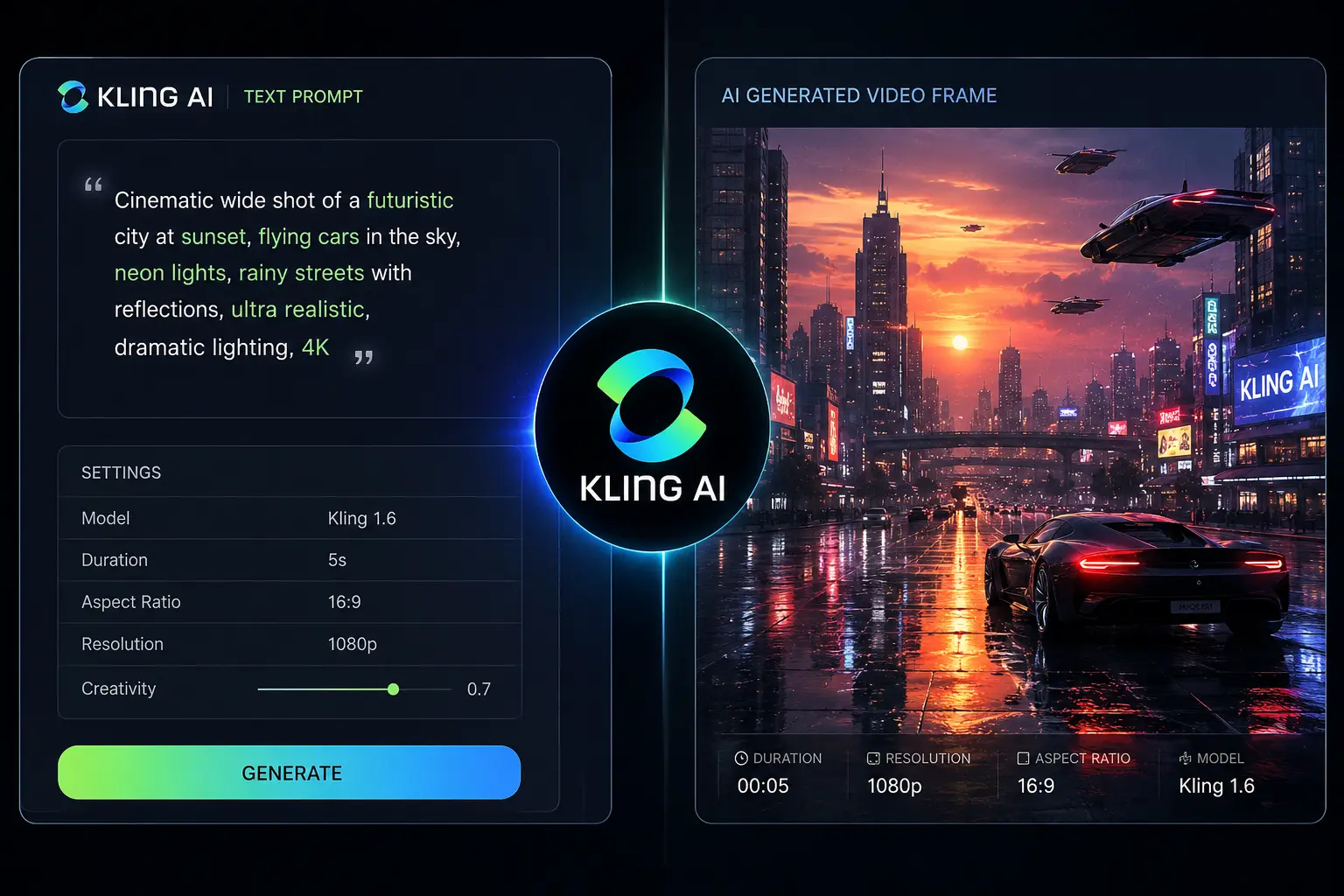
Kling AI runs on a proprietary video diffusion model that extends image diffusion into the time dimension. Where an image generator like Stable Diffusion builds one frame by removing noise step by step, Kling AI does that across a whole sequence of frames at once, with extra machinery to keep those frames related to each other.
The model uses 3D attention layers across both space (height and width) and time (frame sequence), which is what gives it frame consistency: objects and characters keep their appearance as they move because the model is tracking what happened in earlier frames and what needs to happen next. There are also dedicated modules for motion prediction, estimating how pixels should shift from one frame to the next based on the prompt and any starting image.
If you want the technical backdrop, deep learning systems at this scale need heavy compute for both training and inference, and a basic grasp of AI algorithms explains why some prompts come out stunning while others turn into a mess.
Text to Video
Text-to-video is Kling AI’s flagship feature. You type a prompt, pick a style and settings, and it generates a clip. Prompt understanding is a genuine strength here: the model reads spatial relationships, lighting, camera direction, and even emotional tone better than most of the competitors I tested.
As an example, the prompt “A woman walks through a rainy Tokyo street at night, neon signs reflecting in puddles, handheld camera following her from behind, shallow depth of field” produced a clip that held together well: the rain interacted with surfaces, the reflections shifted as the camera moved, and her gait looked natural. Pika 2.0 produced a similar clip in my side-by-side test, but the rain physics were weaker and the neon reflections stayed static.
Where text-to-video breaks down is multi-character interaction. Describe two people talking with specific gestures and the model sometimes blends the characters together or gives them stiff, unnatural hand movements. That’s a weakness across the whole category of AI video generation, not something unique to Kling AI.
Image to Video
The image-to-video pipeline animates a still image based on your prompt, and it’s where Kling AI does its best work. Starting from a real image gives the model a concrete visual anchor, so the results come out more reliable than pure text-to-video.
I tested it with architectural renders, product photos, character art, and landscape photography. A still of a modernist house, animated with “camera slowly orbits the building as clouds move across the sky, golden hour light shifting,” produced footage I could actually use: the shadows lengthened convincingly, the clouds drifted at a believable pace, and the building’s geometry held steady throughout.
For anyone doing image animation, this feature alone can justify the subscription. It lets you bring concept art, product mockups, and architectural visualisations to life without a traditional 3D pipeline, which is likely why the AI smart home and design industries have picked it up quickly.
Video Extension
Video extension takes an existing clip and generates additional frames past its original ending, analysing the last frames and continuing the motion while keeping the visuals consistent. It’s useful for looping backgrounds, stretching b-roll, or pushing a clip past its original length.
I got the most mileage out of it for turning short clips into seamless loops. A 5-second clip of ocean waves, extended to 15 seconds, kept the wave patterns and lighting consistent without obvious seams. The model sometimes introduces a slight colour shift at the extension point, but that’s usually an easy fix with a bit of colour grading afterward.
Camera Controls
Kling AI gives you granular camera controls: pan, tilt, zoom, orbit, dolly, and tracking shots, either through natural-language prompts or preset behaviours in the interface. It reads camera directions accurately, though combining several movements at once can produce odd acceleration curves.
“Slow dolly in on the subject’s face, shallow focus, 35mm lens” reliably does what it says. Add “handheld subtle shake” and you get camera movement that feels like a person holding the camera rather than a locked-off tripod shot. This level of camera movement control matters for cinematic AI work, and it’s one area where Kling AI is ahead of several competitors.
Motion Brush
The motion brush is a standout. You paint over a region of an image and set the direction and intensity of movement for that area: paint the hair and draw an arrow if you want it blowing in the wind while the rest of the body stays still, or brush the clouds one way and the water another to get them moving in different directions.
I used it a lot for product videos, where I wanted subtle movement in the background while the product itself stayed put. Results were precise and controllable, though very fine detail can blur if you push the motion strength too high. It’s a genuine edge for AI content creation work that needs precise motion direction.
Lip Sync
Lip sync generates facial animation to match an uploaded audio track: give it a character image or video frame plus an audio clip, and it animates the mouth to match the speech. The results are decent, but not close-up-ready for professional dialogue scenes yet.
In my tests it worked best with clean audio and front-facing character images; background noise or fast speech knocked accuracy down noticeably. It’s fine for social content, quick explainer videos, and prototyping dialogue, but for polished AI filmmaking you’ll probably still want to pair it with traditional animation.
Character Reference
Character reference tries to keep a character’s appearance consistent across multiple generations. You upload reference images of a character, and later prompts referencing them should come out looking like the same person. It’s a genuinely hard problem in generative AI, and Kling AI’s version works, though not always.
Across ten generations of the same character in different scenes, I got strong consistency in facial structure, skin tone, and body proportions about seven times out of ten. The three misses involved small changes to jawline shape or eye colour. That’s usable for storyboarding and concept work, but for final-frame continuity in a short film, you’ll still need to check it by hand.
Scene Consistency
Scene consistency is how well the generated video holds its environment together across frames, and Kling AI does this better than most, thanks to those 3D attention mechanisms. Backgrounds don’t morph at random, objects stay put, and lighting shifts gradually rather than jumping around.
The place it breaks down is fast camera movement or busy action sequences, where background elements can blur and re-resolve inconsistently. It’s improved with each update, but it’s still worth knowing about before you commit to Kling AI for fast-paced content.
Prompt Understanding and Negative Prompts
Kling AI’s prompt understanding is among the best on the market right now. It parses complex sentences, respects adjective ordering, and reads cinematic terminology accurately. Plain English works fine, though I found structured prompts gave more predictable results.
Negative prompts are supported and actually useful: you can specify what you don’t want, like “no blur, no distorted faces, no extra limbs, no text, no watermarks.” The model follows these reasonably well, though strongly conflicting positive and negative prompts can confuse it. Keep negative prompts short and focused on the exclusions that matter most.
Prompt Formula
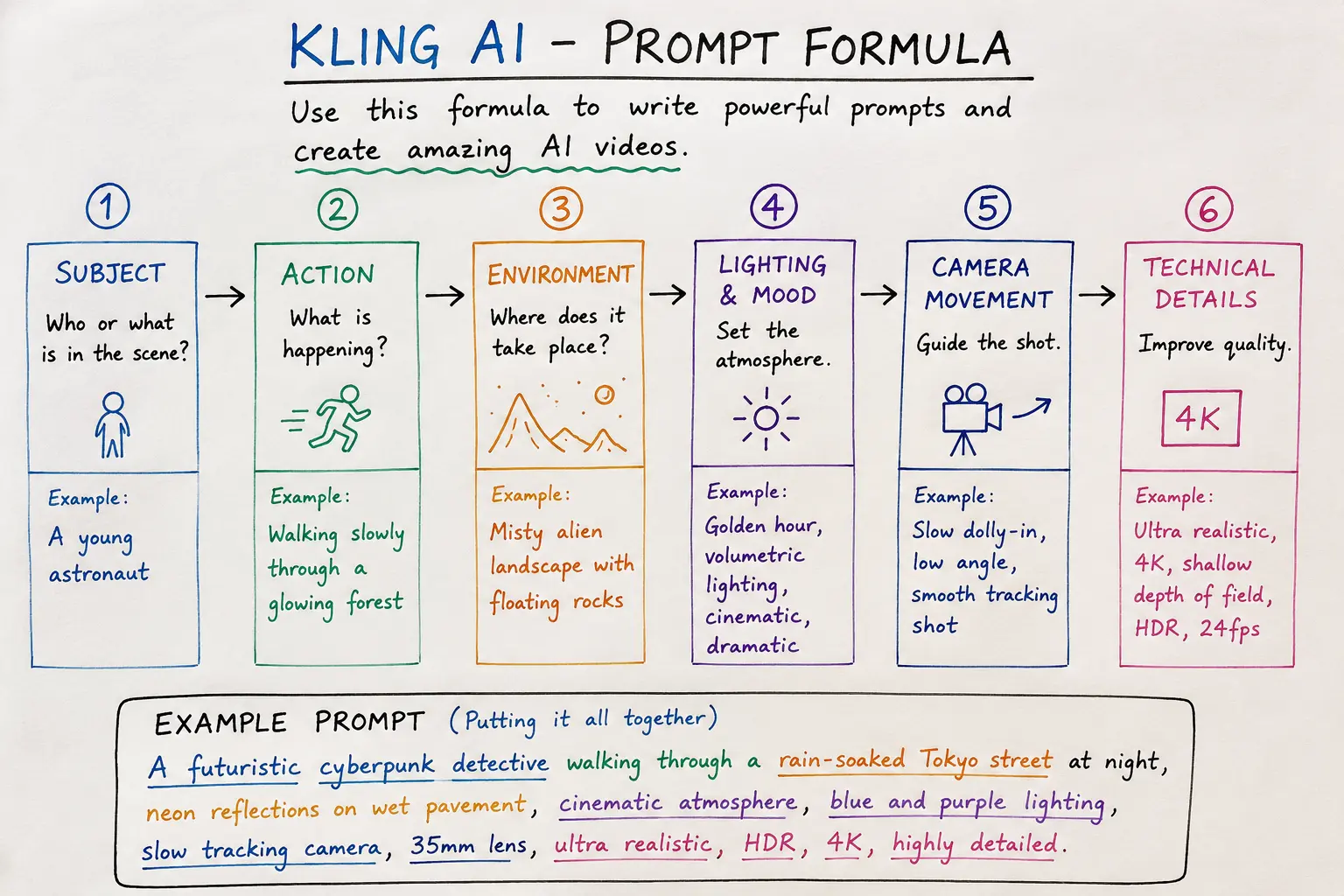
After a lot of testing, here’s the formula that consistently gave me the best results:
[Subject] + [Action/Motion] + [Environment/Setting] + [Lighting/Mood] + [Camera Direction] + [Technical Specifications]
Example: “A young woman in a beige trench coat walks slowly through a misty forest path, soft diffused morning light filtering through the trees, tracking shot from behind at eye level, 24fps cinematic, shallow depth of field.”
This structure gives the model a clear anchor for each part of the scene. Vague prompts produce vague results; specific prompts built this way produce output that’s controllable and repeatable enough for professional video synthesis work.
Best Kling AI prompts and real prompt library
| Style | Prompt Example | Result Quality |
|---|---|---|
| Cinematic | An astronaut stands on a desolate alien landscape, twin moons rising over jagged mountains, dust particles floating in the thin atmosphere, slow orbit shot, 70mm anamorphic lens, film grain | Excellent |
| Anime | A samurai stands atop a wind-swept hill, cherry blossom petals swirling around, dramatic clouds rolling in the background, Studio Ghibli inspired, hand-drawn animation style, slow zoom out | Very Good |
| Product Video | A minimalist wristwatch floating against a dark gradient background, light sweeping across the polished metal surface revealing intricate details, macro lens, slow rotation, 60fps smooth | Excellent |
| Social Media | A barista pouring latte art in a cosy coffee shop, warm tungsten lighting, steam rising gently, vertical 9:16 format, close-up shot, natural handheld movement | Very Good |
Prompt mistakes to avoid
The most common mistake I see is packing a prompt with contradictory instructions, something like “fast-paced action but slow motion,” which just confuses the model. Another is leaving out camera behaviour entirely, which leaves the model to guess and usually produces static-feeling results. And it’s worth avoiding purely abstract prompts like “the feeling of nostalgia”: the model needs something concrete to work from. For more on this, the Complete Kimi Guide covers prompt engineering principles that carry over to video prompting too.
Video quality analysis
At its best, Kling AI’s video could pass for professionally shot footage in a blind test. Skin textures render naturally, fabric moves convincingly, and effects like rain, smoke, and fire behave with plausible physics. Realistic video generation is a clear strength, especially in natural lighting.
Cinematic generation is where it’s strongest overall. Prompts that specify film stock, lens type, and lighting setup come out with real cinematic character, and the model’s handling of depth of field, colour temperature, and contrast suggests its training data included a lot of actual cinematography.
Anime generation is solid but trails dedicated anime tools. It produces clean, stylised animation good enough for social content, though anime purists may notice inconsistent line weight and shading across frames.
Rendering speed
| Video Length | Resolution | Average Render Time (Standard Plan) | Average Render Time (Pro Plan) |
|---|---|---|---|
| 5 seconds | 720p | 45 seconds | 22 seconds |
| 10 seconds | 1080p | 2 minutes 10 seconds | 58 seconds |
| 30 seconds | 1080p | 6 minutes | 2 minutes 45 seconds |
| 60 seconds | 1080p | 13 minutes | 5 minutes 30 seconds |
| 120 seconds | 1080p | 28 minutes | 11 minutes |
Render times hold up well against Runway and beat Luma Dream Machine at equivalent output lengths. Pro plan users get priority queue access, which roughly halves wait times at peak hours.
Supported resolutions, aspect ratios, and video duration
| Specification | Supported Options |
|---|---|
| Maximum Resolution | 1080p (1920×1080) |
| Aspect Ratios | 16:9, 9:16, 1:1, 4:3, 21:9 |
| Maximum Duration (Standard) | 60 seconds |
| Maximum Duration (Pro/Enterprise) | 120 seconds |
| Export Formats | MP4, MOV, WebM |
9:16 vertical support means Kling AI works directly for TikTok videos, Instagram Reels, and YouTube Shorts without needing to crop after export.
Editing features
Kling AI is a generation tool first, not a full editor, though it does include basic trimming, clip combining, and video extension. For anything more involved, you’ll want to export and finish in dedicated editing software, and that’s a reasonable trade-off given the platform is built to do one thing well rather than compete with video editing AI tools directly. If you want something more integrated, our InVideo AI complete guide covers a platform that pairs generation with editing.
Visual styles and animation styles
Kling AI covers a wide range of styles: photorealistic, cinematic, anime, 3D render, oil painting, watercolour, sketch, pixel art, and claymation, among others, and it adapts to whichever style descriptor you put in the prompt with real fidelity. Photorealism and cinematic came out strongest in my testing, followed by 3D render and anime. The more abstract, painterly styles sometimes render inconsistently from frame to frame, which makes sense given how hard it is to hold a painterly texture steady through motion.
Use cases across industries
Marketing videos and advertising
Kling AI holds up well for marketing videos and advertising. Short product showcases, brand teasers, and social ads can be generated fast without booking a production crew, and the image-to-video pipeline is particularly handy here: upload product photography and generate a showcase clip from it. Several agencies I talked to have folded Kling AI into commercial AI video work for quick concept testing and low-budget campaigns.
Social media content
For social media videos, YouTube videos, TikTok videos, and Instagram Reels, Kling AI cuts out a lot of the gap between an idea and a finished clip. Creators can generate b-roll, background footage, and visual effects without a stock footage subscription or a location shoot, and the vertical format support is a real convenience for mobile-first platforms.
Education and gaming
Education content creators use it for animated explainers and historical visualisations. Gaming studios use it for concept trailers, environment flythroughs, and character animation tests. The architecture industry has taken to the image-to-video pipeline for bringing building renders to life, with moving vegetation, shifting daylight, and animated figures for scale.
Filmmaking and business use
AI filmmaking is maybe the most interesting use case. Independent filmmakers use Kling AI for pre-visualisation, shot planning, and generating elements that would be costly to shoot for real. Business use covers internal training videos, product demos, and investor pitch content. How much credibility and trust AI-generated media carries in business settings is still shifting, and it’s worth reading alongside how AI is changing decision-making more broadly.
Commercial licensing
Kling AI grants commercial usage rights on paid plans. Video generated under a Pro or Enterprise subscription can go into client work, advertising, or products for resale. The free plan is restricted to personal, non-commercial use. This is roughly in line with Runway’s approach, and more permissive than some competitors that claim ownership over generated output.
Read the full terms of service before putting Kling AI output into high-stakes commercial work. The legal picture around AI-generated media ownership is still unsettled, and it varies by jurisdiction. If you need commercial AI video with clear licensing, the Pro plan is the minimum you’d want.
API
The Kling AI API launched in early 2026, giving programmatic access to text-to-video, image-to-video, and video extension endpoints. Developers can build Kling AI into their own applications, automate batch generation, and set up custom workflows. Pricing is usage-based, per second of video, scaling with resolution. Documentation is thorough, and the developer dashboard covers usage tracking and cost management.
For startups building AI creator tools, the API is priced competitively against Runway’s enterprise API, and it’s far more accessible than closed systems like Google Veo, which as of mid-2026 is still limited to select partners.
Pricing
| Plan | Monthly Price | Video Minutes | Max Resolution | Commercial Use | API Access |
|---|---|---|---|---|---|
| Free | £0 | 3 minutes | 720p | No | No |
| Standard | £19/month | 15 minutes | 1080p | Yes | No |
| Pro | £49/month | 60 minutes | 1080p | Yes | Yes (limited) |
| Enterprise | Custom | Unlimited | 1080p (4K beta) | Yes | Yes (full) |
The Kling AI free plan is enough to actually evaluate the tool. Three minutes of generation gives you room to try text-to-video, image-to-video, and the motion brush before paying for anything. Standard fits individual creators well, and Pro makes more sense for agencies and content teams.
Pros and Cons
| Pros | Cons |
|---|---|
| Excellent motion consistency and physics | Maximum 1080p resolution on most plans |
| Strong prompt understanding with cinematic terminology | Multi-character interactions can be inconsistent |
| Motion brush provides precise movement control | Lip sync not yet production-ready for close-ups |
| Competitive rendering speed on Pro plan | Content moderation can be restrictive |
| Generous free plan for evaluation | No offline or local deployment option |
| Commercial licensing included on paid plans | Enterprise pricing is opaque |
| API access for developers | 4K resolution limited to Enterprise beta |
| Broad aspect ratio support including vertical 9:16 | Occasional scene consistency breaks on fast motion |
Who should use Kling AI?
Kling AI suits content creators, social media managers, marketing teams, independent filmmakers, and agencies who need to put out video regularly without a big production budget. It’s a good fit for anyone after cinematic AI output with reliable motion consistency and camera control, and developers building AI content creation platforms will get real use out of the API.
If you make short-form video for social platforms, the combination of vertical format support, fast rendering, and commercial licensing makes Kling AI a solid pick. The best AI video editors compared roundup has more on where it sits in the wider tool landscape.
Who should avoid it?
Kling AI isn’t the right tool if you need 4K today, if your project depends on precise multi-character dialogue scenes, or if you need offline, local processing. If your work involves heavy VFX compositing where you need raw, unprocessed generation layers, Runway’s deeper editing toolkit is probably a better fit. Large studios with established 3D pipelines will find it useful for concepting, but not as a replacement for traditional rendering.
Competitor comparisons
Kling AI vs Runway
Runway Gen-3 has a more mature editing suite, handles multi-character scenes better, and has a longer production track record. Kling AI counters with better motion physics, the motion brush, and a more generous free tier. On pure generation quality they’re close. For integrated editing, Runway wins. For prompt-driven cinematic output with tight motion control, Kling AI edges ahead. Both show up in our comprehensive AI video tools comparison.
Kling AI vs Google Veo
Google Veo produces very high-resolution output but remains limited in availability, with no public API or self-serve pricing. Kling AI is open to anyone with an internet connection and a subscription. Until Veo opens up more broadly, Kling AI is the more practical option for most creators, even if Veo’s ceiling is arguably higher.
Kling AI vs Pika
Pika 2.0 is strong on creative, stylised output and has a loyal community behind it. Kling AI leans more photorealistic and has better camera controls. Pika’s lip sync edges it out slightly; Kling AI’s motion brush is more intuitive. Which one fits you depends on whether you want creative expression or cinematic realism.
Kling AI vs Luma Dream Machine
Luma Dream Machine has a distinctive, dreamy, atmospheric look. Kling AI is more versatile across styles and renders faster. Luma’s image-to-video output is excellent but harder to steer than Kling AI’s motion brush. For production work where you need a specific result, Kling AI is the more dependable choice.
Kling AI vs InVideo AI
InVideo AI is a full video creation platform with templates, stock footage, and editing tools, while Kling AI is purely about generation. They solve different problems: use InVideo for quick, template-driven content and Kling AI when you want original, generation-first work. Our InVideo AI guide goes into that platform in more depth.
| Feature | Kling AI | Runway Gen-3 | Pika 2.0 | Luma Dream Machine | Google Veo |
|---|---|---|---|---|---|
| Max Resolution | 1080p (4K beta) | 4K | 1080p | 1080p | 4K |
| Motion Brush | Yes | Limited | No | No | No |
| Lip Sync | Yes | Yes | Yes | No | Limited |
| API | Yes | Yes | No | No | Limited |
| Free Plan | 3 min/month | Limited | 5 min/month | Limited | Waitlist |
| Commercial Use | Paid plans | Paid plans | Paid plans | Paid plans | Unknown |
Real testing observations
Four months in, Kling AI has become my default for image-to-video work. The motion brush alone has saved me from re-rolling clips that moved the wrong way. I’ve used it for client pitch decks where animated product shots made a measurable difference in engagement, and for personal projects where turning still photos into b-roll opened up options I wouldn’t otherwise have had.
It’s not without rough edges. Queue times spike at what I’m guessing are peak Asia-Pacific hours. Content moderation sometimes flags harmless prompts while letting through material that probably shouldn’t pass, which suggests the filter still needs work. And I’ve lost a handful of generations to server errors that didn’t auto-refund credits, though support sorted these out once I flagged them.
For AI animation and generative video work that needs to feel organic rather than synthetic, Kling AI is, right now, the strongest option you can actually get to. It’s not the cheapest, and it’s not the highest resolution, but it produces usable output across the widest range of prompts and styles of anything I tested.
Limitations, privacy, and copyright
Limitations
Kling AI struggles with rapid action sequences, complex multi-character scenes, and long continuous shots. The 1080p ceiling on standard plans is a real constraint for professional work. Hallucinations still show up, extra fingers, morphing background details, physically impossible object interactions, in roughly 5-10% of generations, though that rate has come down with each update.
Privacy
Uploaded images and generated videos are processed on Kuaishou’s cloud infrastructure. The privacy policy says user content isn’t used for model training on paid plans, but free plan users should assume their data may feed back into model improvement. Enterprise customers can negotiate their own data processing agreements. If you’re handling sensitive or confidential visual material, read the current privacy terms closely, or weigh whether an on-premise solution makes more sense for your case.
Copyright
Copyright over AI-generated video is still legally unsettled in most jurisdictions. Kling AI’s terms grant users ownership of generations made on paid plans, but how enforceable that is depends on the country. Free plan output carries a visible watermark; paid plans allow watermark-free exports. On AI generated media disclosure, I’d say be upfront with your audience about using generative tools, both because it’s the right thing to do and because regulation is heading that way.
Deepfake concerns
Kling AI has content moderation aimed at preventing harmful deepfakes, and its terms explicitly ban non-consensual intimate imagery, political disinformation, and similar harmful content. These safeguards aren’t foolproof, but they exist. Anyone using it for AI filmmaking should stay mindful of the ethics involved and think about how the work could be perceived or misused.
Future roadmap
Going by public announcements and the pace of development over the past two years, Kling AI’s roadmap likely includes 4K for all paid plans, longer maximum durations, better multi-character handling, and deeper editing integrations. The Enterprise 4K beta suggests that’s technically doable now and mostly held back by compute cost. I’d also expect the API to add webhook support for asynchronous generation and batch processing, which would make it more useful for production pipelines.
Final Verdict
Of the AI video generators available to the public in 2026, Kling AI is the most well-rounded. It combines strong prompt understanding, motion consistency that’s ahead of most competitors, genuinely useful extras like the motion brush and character reference, and pricing that includes a workable free plan. It has real limits: the resolution ceiling is frustrating, multi-character scenes are hit-or-miss, and content moderation could use work. But for most creators who need to turn ideas into moving images quickly and reliably, it delivers.
For social media creators, marketing teams, indie filmmakers, and agencies, the Pro plan is the current sweet spot. For developers, the API opens up integration options that used to be available only through Runway. For anyone just experimenting, the free plan is generous enough to produce something genuinely usable before you spend a penny.
AI video generation is moving fast enough that this picture could look different in six months. As of mid-2026, though, Kling AI has earned a place near the top of accessible creative AI tools, and it’s still improving.
Frequently Asked Questions
What is Kling AI and how does it work?
Kling AI is a generative AI video platform developed by Kuaishou Technology. It uses advanced video diffusion models to generate realistic video clips from text prompts and still images. The platform processes user instructions through neural networks trained on extensive video datasets, creating smooth frame sequences with strong temporal consistency using 3D attention mechanisms across both spatial and time dimensions.
Is Kling AI free to use?
Yes. Kling AI offers a free plan that includes up to 3 minutes of video generation per month at 720p resolution. The free tier is intended for personal, non-commercial use and exported videos contain watermarks. Paid subscriptions begin at around £19 per month for the Standard plan, which provides 15 minutes of video generation, 1080p exports, and commercial usage rights.
What is the maximum video length Kling AI can generate?
The Standard plan supports videos of up to 60 seconds per generation. Pro and Enterprise subscribers can create videos up to 120 seconds long. Users can also extend existing videos using the Video Extension feature, although very long extensions may gradually lose visual consistency.
Does Kling AI support 4K video generation?
As of mid-2026, 4K video generation is available as a beta feature for Enterprise customers. Standard and Pro plans currently support exports up to 1080p. Kuaishou has indicated that broader 4K availability may arrive as computing costs continue to decrease.
Can I use Kling AI for commercial projects?
Yes. Videos created under the Standard, Pro and Enterprise plans include commercial usage rights, allowing creators to use them in client work, advertising campaigns, digital products and other commercial projects. The free plan does not permit commercial use.
How does Kling AI compare to Runway?
Runway provides a more comprehensive editing environment and supports higher-end post-production workflows. Kling AI, however, stands out for its realistic motion physics, powerful Motion Brush tool and generous free plan. If your focus is cinematic AI video generation, Kling AI is an excellent choice. If you need advanced editing features alongside AI generation, Runway may be the better option.
What is the Motion Brush in Kling AI?
The Motion Brush lets users paint over selected parts of an image and define how those areas should move. You can control the direction and intensity of movement, making it easier to animate specific objects while keeping the rest of the scene stable. It is one of Kling AI’s most distinctive creative features.
Does Kling AI have an API?
Yes. Kling AI introduced its public API in early 2026, offering programmatic access to text-to-video, image-to-video and video extension capabilities. API access is included with Pro plans under usage limits, while Enterprise customers receive higher limits and customised pricing.
What file formats does Kling AI support for export?
Kling AI supports exporting videos in MP4, MOV and WebM formats. MP4 is the default option because it offers the widest compatibility across devices and platforms. Paid subscribers can also customise frame rates and compression settings.
Is Kling AI available worldwide?
Yes. As of 2026, Kling AI is available in more than 180 countries. Certain features may differ depending on regional regulations, and content moderation policies follow both Chinese and international compliance standards, which can occasionally affect generation results.
How good is Kling AI’s lip sync feature?
Kling AI’s lip sync tool performs well for social media videos, presentations and short explainers. While the results are generally convincing, it is not yet ideal for professional film production involving close-up dialogue scenes. Performance is best with clear audio, front-facing characters and minimal background noise.
Can Kling AI maintain character consistency across multiple videos?
Yes, the Character Reference feature is designed to preserve a consistent appearance across multiple generations. In practical testing it performs well in most situations, although occasional variations in facial details and expressions can still occur. It is particularly useful for storyboards, concept videos and recurring digital characters.
What are the best prompts for Kling AI?
The most effective prompts follow a structured format that includes the subject, action, environment, lighting, camera movement and technical details. Clear and specific instructions consistently produce higher-quality videos than vague descriptions. Including details such as lens type, camera angle or cinematic style can further improve the final output.
Does Kling AI own the videos I generate?
No. Users generally retain ownership of videos created under paid subscriptions, subject to Kling AI’s current terms of service. However, the legal status of AI-generated content differs between countries, so businesses should review the latest licensing terms before using AI-generated videos in commercial projects.
What are the best Kling AI alternatives?
Popular alternatives include Runway Gen-3 for advanced editing workflows, Pika 2.0 for stylised animations, Luma Dream Machine for cinematic visuals, Google Veo for premium-quality AI video generation where available, and InVideo AI for template-based content creation. The best platform depends on your budget, workflow and the type of videos you want to produce.
What to Read Next
- 15 Best AI Tools for Video Editing Compared (2026)
- InVideo AI: Complete Guide to the AI Video Generator (2026)
- What Is Generative AI? Complete Technical Guide
- Complete Kimi Guide (2026): Features, Prompts, Coding, Research & Real Tests
- What Is Tripo AI? Complete Guide to the AI 3D Model Generator (2026)
- What Is Machine Learning? A Beginner’s Guide
Editor’s note: Pricing, features, and model capabilities referenced in this article reflect the information available as of mid-2026. The AI video generation landscape evolves rapidly, and readers should verify the latest details on Kling AI’s official website before making commercial decisions. Subscription prices, available plans, resolution limits, and feature availability may change without notice.
Use the key points in this guide to understand the topic and make more informed decisions.

This guide is researched and edited using relevant documentation, reliable sources and publicly available information.
Was this guide helpful?
Your feedback helps us improve future guides.