In this article
Pricing, model availability and generation limits change often. We checked the latest Higgsfield information while writing this guide, but confirm the live pricing page before you subscribe.
Higgsfield AI at a glance
| Category | Details |
|---|---|
| What it is | An AI-native creative suite that puts video generation, image creation, character consistency, marketing tools and agentic workflows on one platform. |
| Best for | Creators, filmmakers, marketers, social media teams, freelancers and small businesses who want multiple AI models and production tools under one subscription. |
| Main creative categories | AI video, AI images, cinematic production, character consistency, ads and marketing assets, audio, explainer videos, app building. |
| Pricing starting point | Starter from around $19/month (270 credits). Higher tiers unlock more credits and unlimited model access. |
| Credit model | Subscription plans include a monthly credit allowance. Additional credit packs can be purchased. Different models consume different amounts of credits per generation. |
| Key advantage | One subscription gives access to 40+ AI image and video models, plus Higgsfield’s own tools for character consistency and cinematic control. |
| Main limitation | Premium models use up credits quickly. “Unlimited” access covers specific models and time windows, not everything on the platform. |
What is Higgsfield AI?
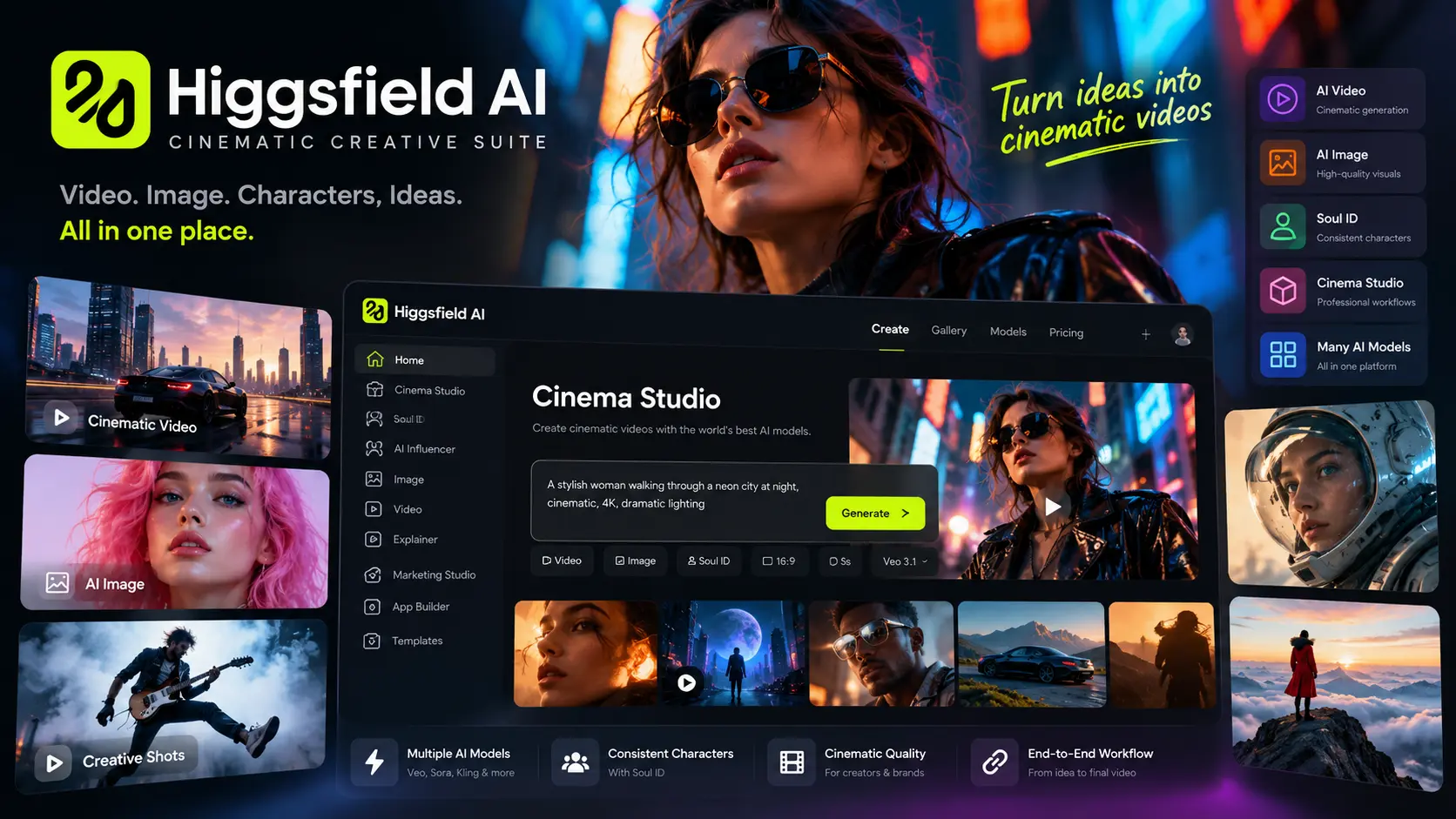
Anyone who has spent time around AI video on social media in 2026 has probably seen the name Higgsfield. The company has raised significant funding and has a reputation for cinematic output. Calling it an “AI video generator” undersells it now.
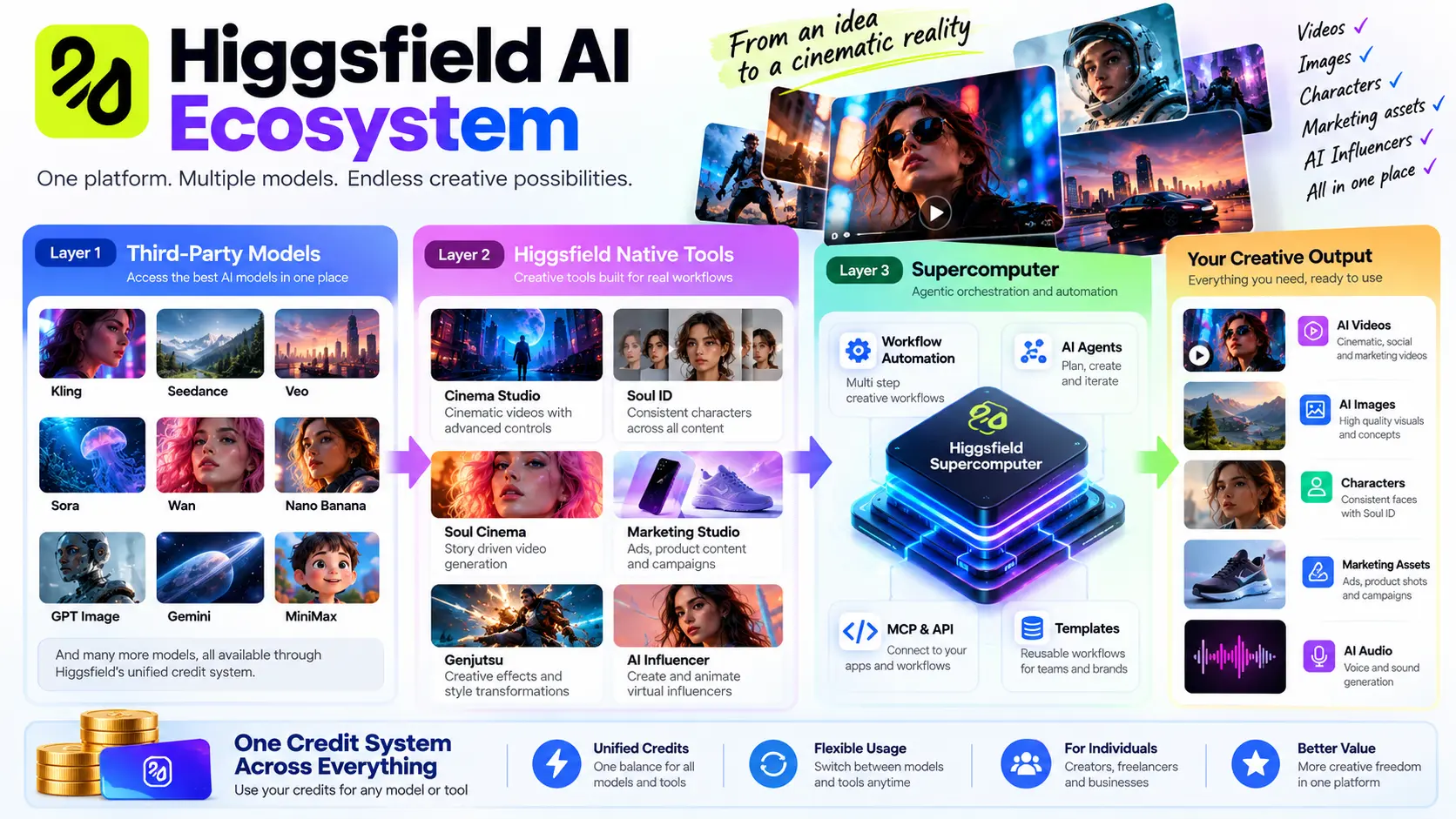
Higgsfield is an AI-native creative suite. It offers a large catalogue of third-party models (Kling, Seedance, Veo, Sora and others) alongside its own creative tools for filmmakers, marketers and character-driven content. Supercomputer adds agentic workflows, and developers get API and MCP access.
The result feels less like one tool and more like a production environment. You can generate an image, lock a character’s face with Soul ID, animate that character in Cinema Studio, recast an existing video with Genjutsu, and turn a product URL into a video ad with Click to Ad, all from one dashboard.
Breadth is the pitch. Whether it pays off depends on your workflow and how often you reach for premium models, which we cover below.
What can you actually create with Higgsfield?
Here is what the platform covers, based on Higgsfield’s official pages and documentation.
For video, it makes short clips, cinematic scenes, social content, product demos and narrative sequences. Depending on the model, it supports text-to-video, image-to-video and video editing. Cinema Studio 4.0 handles the cinematic side, with structured control over camera movement, lens, lighting and pacing, for creators who want more than a one-click preset. Vertical formats for TikTok, Reels and Shorts are supported, and there are templates and presets tuned for social platforms.
For ads and product content, Marketing Studio has modes for UGC-style videos, talking-head presenters, product showcases, unboxing reveals and more, plus templates for different ad formats. Click to Ad can turn a product URL into a finished video ad, and Supercomputer can orchestrate multi-step marketing campaigns.
For characters, Soul ID trains on 20 to 80 photos of a person and keeps that face consistent across generations. AI Influencer creates synthetic personas that Genjutsu can animate.
Image generation runs through several models, including Higgsfield’s own Soul series and third-party options like Nano Banana and Seedream. Audio generation is available through certain workflows and models, though it is not the main focus. Because iteration is fast, the platform is also useful for storyboards and for testing visual ideas before committing to a full production.
Related reading: If you want to know how these systems work, our guide to generative AI covers the core ideas behind models like the ones Higgsfield uses. For the wider set of current models, see our roundup of the latest AI models in 2026.
Higgsfield’s main tools explained
Higgsfield’s native tools are what set it apart from a plain model aggregator. These are the ones that matter most as of October 2026.
Cinema Studio (4.0)
Cinema Studio is Higgsfield’s flagship video production workspace. Version 4.0 runs on Seedance 2.5 and has four modes: text-to-video, omni-reference, video edit and video extension. It has structured controls for camera body, lens, aperture, era, genre, pacing, lighting and colour palettes, so it suits filmmakers, cinematographers and creators who want deliberate control over how a shot looks and moves. Most AI video tools give you a prompt box and hope for the best. Cinema Studio works more like a virtual film set, with camera presets and lighting controls, which matters for narrative work and branded content.
Say you want a slow dolly-in on a product against a dark background with warm rim lighting. You pick the movement preset, set the lighting temperature, choose a lens and generate, and you can adjust the camera move without regenerating from scratch. The costs: a 5-second clip at 720p uses 25 credits, premium resolutions and longer durations cost more, and the learning curve is steeper than a one-click tool.
Soul Cinema
Soul Cinema belongs to Higgsfield’s Soul image model family and is tuned for cinematic-grade visuals, including close-ups, moody scenes and era-specific looks. It supports Soul HEX for colour control and Soul ID for character consistency. It suits creators who want stills with a film-like look, or a cinematic starting point before animating, and good AI video often starts from a strong reference frame. For example, generate a close-up portrait with Soul Cinema, then use it as the first frame in Cinema Studio to animate a subtle head turn. It is an image model, not a video model, so it is one stage of the pipeline rather than the whole thing.
Soul ID
Soul ID handles character consistency. You train it on 20 to 80 photos of one person, and the same face shows up across generations whatever the style, pose or lighting. It is aimed at anyone building a recurring character, an AI influencer or a branded presenter. Consistency is one of the hardest problems in AI content, and without it a character’s face drifts between shots. You could train a Soul ID on a model, then generate twenty images of that model in different outfits and locations with the face staying the same. Two caveats: it is bound to the model you train it on, and you need a clean set of reference photos. Training takes a few minutes.
Soul HEX
Soul HEX is a colour control feature inside Soul 2.0. Upload a reference image and it extracts the palette and applies it to your generation. It also has built-in presets. Designers, brand teams and creators who need colour consistency across a campaign will get the most from it, since colour is one of the fastest ways to make content feel cohesive and this locks a palette without manual grading. If you have a brand palette, upload a reference image that uses those colours and Soul HEX applies them to your generated images. It is a colour tool, not a full style transfer, and will not copy composition or lighting from the reference.
Supercomputer
Supercomputer is an agentic workspace that can research, write code, work with files, and create images, video and audio in one place. It orchestrates multiple models and skills to finish multi-step tasks, and it is aimed at creators and teams who want to automate repetitive workflows or produce content at scale. Instead of running five generations by hand and stitching the assets together, you describe the outcome and it handles the pipeline. For a product launch, it can plan a week’s worth of social content, generate the assets and assemble them. It is not designed for narrative film creation. It does well on general multi-industry tasks but has been reported to lack persistent memory across steps, which can frustrate complex film projects.
Marketing Studio
Marketing Studio is the ad creation workspace, with 1,500+ templates organised by use case and modes for UGC, talking-head, silent, product showcase and more. Click to Ad, a feature inside it, turns a product URL into a finished video ad: paste the URL and it scans the page for product images, copy, brand colours and logo, then assembles the ad from a template. It is for marketers, e-commerce brands, agencies and small businesses that need ad creative without a production crew, and ad creation is one of the most practical uses of AI video. The catch is that template-driven output can feel generic if you do not customise enough, and quality depends heavily on the product assets you provide.
Genjutsu
Genjutsu recasts an existing video. You swap characters, locations or products while the original motion, camera work and timing stay intact. Creators can reuse a proven video format with different characters or products, and brands can localise ads for different markets. Reshooting is expensive, and Genjutsu changes the cast without changing the choreography. You could take a viral dance video and replace the dancer with your AI influencer character, with the motion unchanged. It works best with clear, well-lit reference footage. Complex scenes with multiple people or fast motion can produce artefacts.
AI Influencer
AI Influencer creates synthetic personas from appearance settings, with an optional photograph as a facial reference. It produces a portrait and a full-body image, then uses Genjutsu to animate them. Social media creators, brands building a virtual spokesperson and anyone experimenting with AI personas are the audience, and it packages character creation and animation into a guided process. For instance, you can generate a character and then animate them performing a trending dance with Genjutsu. One generation costs 1.12 credits (about $0.06) and returns two images, and animation is a separate step.
Explainer
Explainer is a Supercomputer skill that turns a topic or brief into a narrated 2D explainer video. It plans the piece, drafts a script, and generates visuals and narration. Educators, YouTubers and businesses that need explainer content without a production team are the fit, and automating the pipeline saves significant time on a format that works well for teaching and marketing. Give it a topic and a duration and it produces a narrated video with matching visuals. Because it is a Supercomputer skill and not a standalone tool, you need access to Supercomputer to use it.
App Builder
App Builder is part of Higgsfield Apps, inside Supercomputer. You describe a site or app, and the agent builds the frontend, backend, database and sign-in, then deploys it to a live URL. Images and video generated by Higgsfield can be embedded in the app. It is meant for developers, indie makers and creators who want to ship small apps or websites quickly, and it extends Higgsfield beyond content creation into product building. Describe a simple portfolio site with AI-generated hero images, for example, and it creates and deploys it. It is in preview (beta) as of October 2026 and is not a replacement for a full development workflow.
MCP and API
Higgsfield MCP (Model Context Protocol) connects Higgsfield’s image, video and audio models to AI chat tools like Claude and ChatGPT, and the API lets you generate video and images from your own code. Both are aimed at developers, technical creators and teams who want to bring Higgsfield into their own tools, and they turn it from a web app into a platform you can embed in other workflows. With the MCP server URL, you can generate images and videos directly inside a Claude conversation. The API needs technical setup, and the documentation is at docs.higgsfield.ai.
Higgsfield AI models
Higgsfield offers a large catalogue of third-party models alongside its own tools. The catalogue changes, so check the model selector in the app. The table below compares the main ones.
| Model | Type | Best For | Relative Credit Cost | Notes |
|---|---|---|---|---|
| Seedance 2.0 / 2.5 | Video | Cinematic quality, fast iteration | Mid (around 23 credits for 5s 720p) | Powers Cinema Studio 4.0. Strong motion and visual quality. |
| Kling 3.0 | Video | Complex motion, character animation | Low to mid (around 6 to 14 credits per clip) | Popular for dance and action content. |
| Veo 3.1 | Video | Realism, nature, reference-based generation | Premium (40 to 70 credits per generation) | High credit cost but strong output quality. |
| Sora 2 | Video | Creative, stylised video | Premium (40 to 70 credits per generation) | Available on higher plans. |
| Wan 2.7 | Video | General video generation | Mid | Available in the catalogue. |
| Nano Banana (Pro) | Image | Fast image generation | Low (around 2 credits per image) | Good for rapid iteration and reference images. |
| Seedream 5.0 | Image | High-quality stills | Mid | Available in Pro and Lite variants. |
| GPT Image | Image | Text-to-image, editing | Mid | Available through the catalogue and MCP. |
| Gemini | Image / Video | Multi-modal generation | Varies | Available through workflows. |
| Soul (native) | Image | Realistic portraits, cinematic stills | Low | Includes Soul ID and Soul HEX for consistency and colour control. |
Credit costs are approximate and can change, so check the model selector before generating.
Higgsfield AI pricing in 2026
Higgsfield’s pricing has changed several times in 2026. This is the current structure as far as we can tell. Prices vary by region, promotion and billing cycle, so check the official pricing page before subscribing.
| Plan | Monthly Price | Annual Price (per month) | Credits/Month | Key Model Access | Best For | Main Limitation |
|---|---|---|---|---|---|---|
| Starter | $19 | $19 | 270 | Selected models only. No Seedance 2.5. Kling 3.0 at 720p, Seedance 2.0 Fast and Mini. | Casual creators testing the platform. | Limited model access. Credits run out quickly with premium models. |
| Plus | $59 | $47 | 1,200 | Full Seedance 2.0, Kling 3.0, Veo 3.1, Sora 2 and more. 7 days of All Unlimited access with purchase. | Serious creators and freelancers who need regular output. | 1,200 credits can still be consumed quickly with premium models. |
| Ultra | $129 | $99 | 3,000 | All models, including premium options. Higher unlimited allowances. | Professional creators, small studios, high-volume marketers. | Higher monthly cost. Still not unlimited everything. |
| Team | $79/user | Approx. $62/user | 1,500/user (shared pool) | All models. Priority queue, SSO, per-member spend controls. | Small teams and agencies. | 2 to 15 seats. The shared credit pool can cause contention. |
| Scale | $169/user | Approx. $150/user | 12,500 pooled | All models. Priority queueing, SSO, advanced admin controls. | Larger teams and agencies with high volume. | Up to 15 seats. Higher cost per user. |
| Enterprise | Custom | Custom | Custom | Dedicated capacity, volume discounts, SOC 2. | Large organisations with compliance needs. | Sales negotiation required. |
What “unlimited” actually means. Higgsfield’s “unlimited” access covers specific models, not the whole platform. Most included models come with 365-day unlimited access, but the newest flagship models may get shorter windows, such as 7 days, and some models come with a pool of free generations instead. Fair use rules apply too, so it is not a blank cheque for unlimited generations on every model at every resolution.
Credit packs. If you run out of credits you can buy more. Packs run from 80 credits for $5 to 1,700 credits for $80, which works out to roughly $0.0625 per credit at the smallest pack and about $0.047 at the largest. You need an active subscription to buy them.
How much does an AI video actually cost on Higgsfield?
Credit costs depend on model, resolution and duration. This table shows the current figures we found.
| Model/Tool | Resolution | Duration | Credits | Approx. Cost (Plus plan) | Best For |
|---|---|---|---|---|---|
| Kling 3.0 | 720p | 5 seconds | 6 to 7 | ~$0.34 | Fast, low-cost motion tests |
| Kling 3.0 | 720p | 8 seconds | ~14 | ~$0.69 | Short social clips |
| Seedance 2.0 | 720p | 5 seconds | ~23 | ~$1.08 | Cinematic quality |
| Seedance 2.0 | 1080p | 5 seconds | ~45 | ~$2.20 | High-quality output |
| Cinema Studio | 720p | 5 seconds | 25 | ~$1.23 | Controlled camera work |
| Cinema Studio | 1080p | 5 seconds | 50 | ~$2.46 | Professional cinematic output |
| Veo 3.1 | Varies | Varies | 40 to 70 | ~$1.97 to $3.44 | Realism and reference-based generation |
| Sora 2 | Varies | Varies | 40 to 70 | ~$1.97 to $3.44 | Stylised creative video |
| Nano Banana Pro | Image | N/A | ~2 | ~$0.10 | Fast image iteration |
| AI Influencer | Image | N/A | 1.12 | ~$0.06 | Character creation |
What this means in practice. If you mainly make short social clips with Kling 3.0, the Starter plan’s 270 credits can go reasonably far. If you are constantly testing Veo 3.1 or Sora 2, the economics change fast, and premium models can eat through a monthly allowance in a handful of generations.
On the Plus plan, 1,200 credits might cover around 50 Kling 3.0 clips but only about 17 Veo 3.1 generations. Cheaper models give you volume, and premium models give you quality at a higher cost per output.
Higgsfield AI vs other AI video generators
Higgsfield is not the only platform that bundles multiple models. Here is how it stacks up against some alternatives.
| Platform | Model Choice | Cinematic Quality | Character Consistency | Editing | Image Generation | Pricing Approach | Best User |
|---|---|---|---|---|---|---|---|
| Higgsfield | Very broad (40+ models) | Strong (Cinema Studio) | Excellent (Soul ID) | Built-in video edit modes | Yes (Soul, Nano Banana, etc.) | Subscription + credits | Creators who want one suite for video, image and marketing |
| Runway | Moderate | Strong | Moderate | Strong editing tools | Yes | Subscription | Filmmakers and editors |
| Kling (direct) | Kling models only | Strong for motion | Limited | Basic | Yes | Subscription + credits | Motion-heavy social content |
| Google Flow / Veo | Veo models | Very strong realism | Limited | Moderate | Yes | Subscription | Realistic scenes and nature |
| InVideo AI | Own models | Moderate | Limited | Strong for editing | Yes | Subscription | Editing and template-based workflows |
No platform wins every category. Higgsfield’s advantage is breadth: multiple models, a native character-consistency tool, marketing workflows and an agentic layer in one place. Runway is stronger for pure editing, Kling direct focuses on motion and Veo on realism, so the right pick depends on what you need most.
Related reading: For more on one of the third-party models Higgsfield offers, see our Kling AI complete guide. Our comparison of 15 AI video editors covers video editing tools more broadly, and the InVideo AI complete guide looks at a template-based alternative.
What makes Higgsfield different?
Higgsfield’s core difference is aggregation plus orchestration. Buying Kling, Veo, Sora and Nano Banana separately means four subscriptions, four interfaces and four credit systems. Higgsfield puts them under one roof with one credit balance.
Different models excel at different things: Kling at complex motion, Seedance at cinematic quality, Veo at realism, Sora at creative stylisation. With all of them in one place you can pick the right tool for each shot without switching platforms.
Soul ID is a genuine differentiator. Most platforms have no native tool for locking a character’s face across generations, and that is essential for recurring characters, AI influencers and branded content.
Cinema Studio, Marketing Studio and Genjutsu are more than wrappers around models. They are purpose-built workflows: Cinema Studio for cinematic control, Marketing Studio for ads, Genjutsu for recasting existing video. Supercomputer adds an automation layer most competitors lack, where you describe a multi-step outcome and the system orchestrates models and workflows to get there. MCP and API support mean Higgsfield can be embedded in other tools and not only used through a web interface.
The trade-off is complexity. With 40+ models and several workflow tools, the learning curve is steeper than a single-model tool. Every generation also has a cost, so choosing the wrong model can waste credits quickly.
How to make better Higgsfield videos
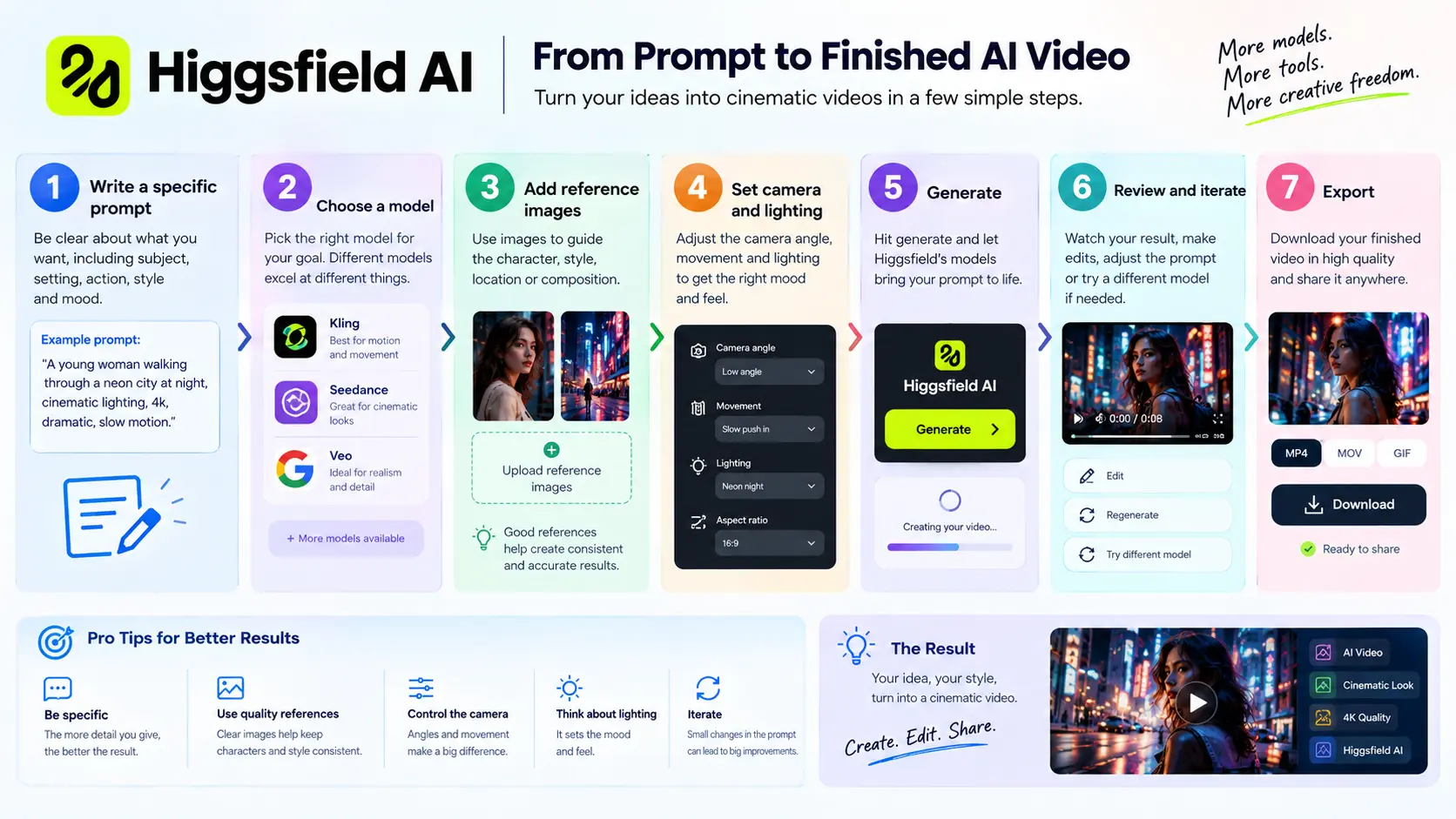
A reference image is often more powerful than a paragraph of text, so if you want a specific look, upload one. Cinema Studio supports up to 50 references. If you are using a recurring character, train Soul ID before you start generating scenes so every shot uses the same face from the beginning.
Be specific about camera direction. Instead of “a cinematic shot,” say “a slow dolly-in from a low angle, 35mm lens, shallow depth of field.” Cinema Studio has presets for movement, lens and lighting, and they are worth using. Describe movement just as clearly: “she turns her head slowly to the left” beats “she moves.” Lighting sets the mood too, since “warm rim lighting with a dark background” reads very differently from “soft diffused daylight.” For composition, name the framing (close-up, medium shot, wide shot) and say where the subject sits in the frame.
Keep shots short. Five-second clips are the standard unit, and longer durations cost more credits and can introduce artefacts, so build sequences from short shots. Set the aspect ratio before you generate: 9:16 for TikTok, Reels and Shorts, 16:9 for YouTube and cinematic work, 1:1 for feed posts. If you are making a sequence, keep the character, lighting and colour palette consistent from shot to shot. Soul ID and Soul HEX help here.
Higgsfield prompt formula
This simple formula works across models:
Subject + environment + action + camera + lighting + mood + visual style + movement + constraints
- Subject: who or what is in the shot. Be specific about appearance, clothing and expression.
- Environment: where the scene takes place. Time of day, weather, location details.
- Action: what the subject is doing. Use strong verbs.
- Camera: shot type, angle, movement and lens. Example: “close-up, eye level, 50mm lens.”
- Lighting: direction, quality and colour. Example: “soft key light from the left, warm tone.”
- Mood: the emotional tone. Example: “tense,” “playful,” “melancholic.”
- Visual style: the aesthetic. Example: “film noir,” “clean commercial,” “documentary.”
- Movement: how things move within the frame. Subject movement and camera movement.
- Constraints: what to avoid. Example: “no text on screen,” “no fast cuts.”
Before: “A woman walking in a city.”
After: “A woman in a beige trench coat walks confidently through a rain-slicked Tokyo street at night. Neon reflections on wet asphalt. Medium tracking shot from behind, 35mm lens, shallow depth of field. Cool blue and magenta lighting. Moody, cinematic. Slow, deliberate movement. No text, no on-screen graphics.”
The second prompt gives the model far more to work with.
Best Higgsfield use cases
| User | Best Higgsfield Use | Why |
|---|---|---|
| TikTok creator | Short vertical clips with Kling 3.0 or Seedance 2.0 Fast | Low credit cost, fast iteration, native 9:16 support. |
| YouTube creator | Explainer videos, B-roll, thumbnails | Explainer skill automates narration. Nano Banana for fast thumbnail iteration. |
| Filmmaker | Cinema Studio for controlled shots, Soul ID for characters | Camera presets, lighting controls, character consistency across scenes. |
| E-commerce brand | Click to Ad and Marketing Studio for product videos | Turns product URLs into video ads. UGC-style templates. |
| Marketing agency | Supercomputer for campaign orchestration, Marketing Studio for creative | Multi-step automation. Template library for different ad formats. |
| Freelancer | Plus plan for client work across video and image | One subscription for multiple models. Can deliver diverse outputs. |
| Designer | Soul HEX for colour control, Soul Cinema for stills | Palette extraction and cinematic image quality. |
Related reading: Our guides to AI customer support, AI logistics for e-commerce and AI leadership look at how AI is changing business workflows. Our piece on how AI builds business credibility covers brand trust.
Higgsfield AI: pros and cons
| Pros | Cons |
|---|---|
| Access to 40+ AI image and video models in one subscription | Premium models consume credits very quickly |
| Soul ID keeps characters consistent across generations | “Unlimited” access is limited to specific models and time windows |
| Cinema Studio offers structured camera and lighting controls | Steeper learning curve than single-model tools |
| Marketing Studio and Click to Ad are practical for ad creation | Template-driven output can feel generic without customisation |
| Supercomputer adds agentic automation for multi-step workflows | Supercomputer has been reported to lack persistent memory for complex film projects |
| MCP and API access for developers | API requires technical setup |
| One credit system across all models | Credit costs vary significantly by model, making budgeting tricky |
| Fast iteration and generation speed | Output quality can be inconsistent across models |
| Strong for short-form and social content | Less suited for long-form narrative film production |
Is Higgsfield AI worth it in 2026?
The answer depends on who you are.
Casual creator. If you make social clips occasionally, Starter is a reasonable way in, but the 270 credits disappear quickly on premium models. Unless you specifically want Higgsfield’s model access, a simpler tool may suit you better.
Serious creator. If you produce content regularly, Plus makes more sense. The 1,200 credits leave room to work with a mix of models, and the 7-day All Unlimited access that comes with purchase is a useful way to test.
Filmmaker. Cinema Studio 4.0 and Soul ID are genuinely useful for narrative work, since the camera controls and character consistency solve real problems. But Supercomputer’s memory limits and the credit cost of premium models mean it will not replace a traditional production pipeline. Treat it as a pre-visualisation and short-form tool.
Marketer. Marketing Studio and Click to Ad are strong for ad creation, and the template library covers many formats. If you need volume and speed, Higgsfield delivers.
Agency. The Team and Scale plans bring shared credit pools, priority queues and SSO, which suits teams. You do need to watch credit consumption to avoid running out mid-project.
Business. Enterprise pricing and dedicated capacity are available. The question is whether your team needs this many models. If you only need one, a direct subscription may be cheaper.
Who should use Higgsfield and who should skip it?
Choose Higgsfield if:
- You want multiple AI video and image models without multiple subscriptions.
- You need character consistency for recurring content or AI influencers.
- You make cinematic short-form content and want camera and lighting controls.
- You make ads and product videos and want a guided workflow.
- You want to automate repetitive creative tasks with agents.
- You are a developer who wants API or MCP access to a range of models.
Skip Higgsfield if:
- You only need one specific model and do not care about the rest.
- You are on a very tight budget and cannot afford credit overages.
- You need long-form narrative film production with persistent project memory.
- You prefer a simple one-click tool with no learning curve.
- You need guaranteed consistency across every generation, every time.
Final verdict
Higgsfield is one of the most comprehensive AI creative suites available in 2026. The broad model catalogue, native character-consistency tools, cinematic controls and agentic workflows are all useful. It is not a magic button, and you have to keep an eye on credits, but for creators who want range and will put in the time to learn it, there is a lot here.
To decide, start with the cheapest plan that includes the models you want, run your real workflow, and watch how fast the credits go. Upgrade if you keep hitting limits. Otherwise, stay put.
Prices can change by region, promotion and billing cycle. Check Higgsfield’s current pricing page before subscribing.
We consulted these sources while preparing this guide, prioritising official Higgsfield sources.
- Higgsfield official site. Product pages, feature descriptions and tool documentation. https://higgsfield.ai/
- Higgsfield pricing page. Plan structure, credits and billing options. https://higgsfield.ai/pricing
- Higgsfield Help Centre. Soul ID documentation, unlimited models explanation, API setup. https://higgsfield.ai/creator-hub/help-center
- Higgsfield API documentation. API setup and reference. https://docs.higgsfield.ai
- Higgsfield blog. Product announcements for AI Influencer, Marketing Studio, Supercomputer and Cinema Studio 4.0.
- Higgsfield changelog. Feature releases and updates. https://higgsfield.ai/whats-new
- Third-party pricing analysis. Krea.ai, Creatify.ai, Luma Labs and CostBench pricing comparisons (used for cross-verification only).
- Independent reviews. Invideo.io, ImageAt and FixThePhoto comparisons (used for context on competitor positioning).
- Google Search Central. Search quality guidance for 2026. https://developers.google.com/search
Pricing and feature information was checked against the latest Higgsfield sources available in October 2026. Where figures vary by region, promotion or billing cycle, the article says so.
Use the key points in this guide to understand the topic and make more informed decisions.

This guide is researched and edited using relevant documentation, reliable sources and publicly available information.
Was this guide helpful?
Your feedback helps us improve future guides.