
In this article
Be honest for a second. Somewhere on your phone or laptop right now, there is probably an AI tab still open. ChatGPT for the quick stuff, Gemini because it came bundled with everything you already use, Claude when the assignment gets serious. And in between all of that, a quiet question has started nagging people: where do all these conversations actually go?
That is roughly the question Proton asked before building Lumo. Proton Lumo AI is the company’s answer to a specific frustration: AI assistants are genuinely useful, but most of them run on a business model built around collecting data. Lumo flips that starting point. It is an AI assistant designed so that, according to Proton’s documentation, your chats stay yours, are not used to train models, and can even be used with no account at all.
In this guide, we break down what Proton Lumo AI actually is, how its privacy architecture works, what its guest mode does, what you can realistically use it for in 2026, and how it compares conceptually with the big names you already know. If you have ever wanted to use AI without feeling like you handed over a piece of your life to do it, keep reading.
What is Proton Lumo AI?
Lumo AI is Proton’s AI chat assistant, launched publicly in 2025 and substantially upgraded since. If you know Proton, you probably know it from Proton Mail, Proton VPN, Proton Drive or Proton Pass, the privacy ecosystem that grew out of encrypted email. Lumo extends that same philosophy to AI chat. It is a general-purpose assistant you can use for writing, research, coding help, summarizing documents and brainstorming, built on top of large language models like most modern assistants. The difference is the plumbing around the model, not the model itself.
To be clear about what Lumo is not: it is not a homegrown ChatGPT killer built entirely from scratch. According to Proton’s own materials, Lumo routes conversations through various language models and selects among them, and Proton has stated goals of contributing to open-source AI efforts. Its Apertus model effort was referenced in Proton’s privacy documentation as a project that can receive anonymized user feedback, which signals where the company is investing. What Proton controls is the service layer: how your prompt travels, whether it is logged, what is stored afterward and what is deleted.
If you are brand new to how these systems reason at all, our explainer on what artificial intelligence actually is is a good warm-up, and the companion piece on generative AI covers how text-producing models behave.
Quick take
Lumo AI in one paragraph: a private AI chat assistant from Proton, usable free without an account, with optional web search, file analysis and coding help. Chats are processed on Proton-controlled European servers, are not logged, are not used for model training, and are deleted after processing. With an account, your chat history is stored with zero-access encryption. It competes on privacy, not raw model power.
Why does Proton, an email company, even have an AI assistant? Because AI chat is quickly becoming the front door to everything people do online, and Proton’s position is that AI assistants can process a large amount of personal context. When you ask an assistant to summarize your lease, debug your side project, or draft a message to your landlord, you are handing it some of the most intimate data you generate. Proton saw an opportunity to offer that experience without the standard data-collection baggage. It also fits the moment: as our piece on protecting your data from automated AI web scrapers explains, the tension between AI usefulness and data exposure has become a mainstream concern, not just a niche one.
Why Proton built an AI assistant
Proton was founded in 2014 by scientists who met at CERN, and the whole company has been organized around one idea: encryption by default. Proton Mail popularized zero-access encryption for email, meaning even Proton cannot read your inbox. Over a decade, the company stacked services on that foundation, from VPN to cloud storage to password management.
An AI assistant seems like an odd next step until you look at how most assistants monetize. The typical pattern is spelled out in privacy policies: conversations may be retained, reviewed by humans, and used to train future models. Proton’s bet is that a meaningful group of users, students, journalists, lawyers, activists, or just people with a healthy skepticism, want an assistant that does not do any of that. Lumo is the product expression of that bet.
This is not meant to be an ad for Proton. The company has its critics, and privacy marketing deserves the same scrutiny as any other marketing. But the architectural commitments here are documented rather than vague promises, and as we will see later, Lumo’s code is open source, which lets outsiders check the claims instead of taking them on faith. For context on where this sits philosophically, our guide to narrow AI versus AGI versus superintelligence explains why today’s assistants, Lumo included, remain narrow tools despite feeling conversational.
How Lumo AI works
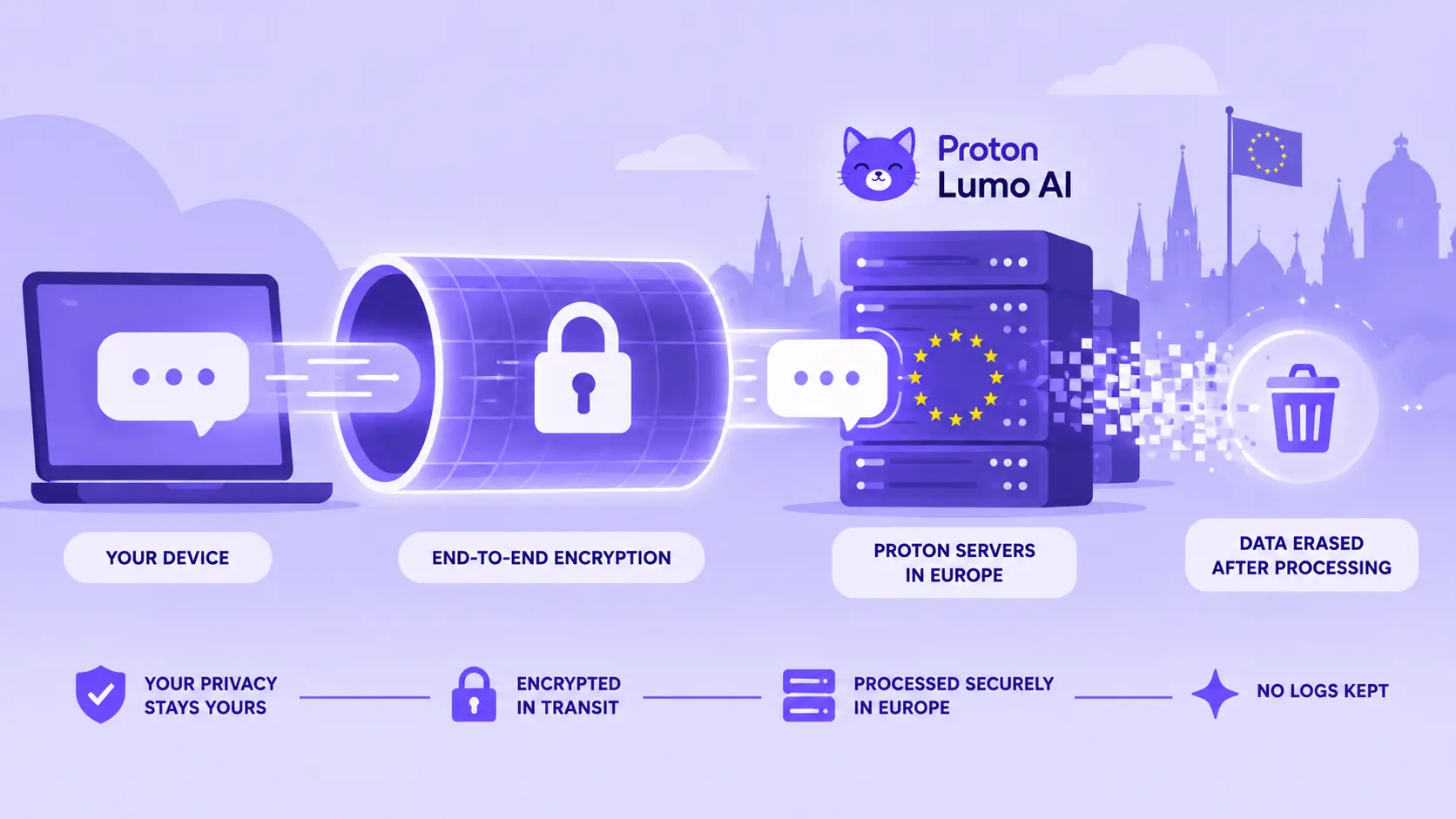
Proton’s published security documentation describes what happens to a message after you press send.
The Lumo AI request flow
Proton states that prompts are asymmetrically encrypted in transit so that only Lumo’s own GPU servers can decrypt them, and that no logs of your questions or Lumo’s replies are kept.
A few pieces of that pipeline deserve unpacking. First, model routing: Lumo uses multiple large language models and, according to Proton, automatically selects among them depending on the task. In 2026 the service offers faster and higher-capability model tiers, which matters when you are deciding between a quick lookup and a heavy reasoning job. Second, conversation context: within a session, Lumo keeps track of what you said earlier, like any chat assistant. The interesting part is what happens after. Proton’s support documentation states that once a query is processed and answered, the data is erased, with the only remaining copy living on your own device.
Third, optional extras. Web search is available but off by default, so Lumo answers from its model knowledge unless you switch search on. File uploads let you attach documents for analysis, and Proton Drive integration lets logged-in users pull encrypted files straight into a chat. If you are curious about the retrieval techniques behind features like this, our complete RAG guide explains how assistants ground answers in external sources.
And fourth, encryption of saved history. If you use Lumo with an account, past conversations sync to your devices under zero-access encryption, meaning Proton’s servers hold ciphertext only you can unlock. If you want the broader AI context behind the models Lumo uses, our beginner-friendly guide to machine learning basics is a useful starting point. The model does not need your data to be readable by humans, so the architecture avoids making it readable to humans.
Lumo AI Guest Mode Explained
Here is the part that genuinely surprises people. The URL associated with this guide points at Lumo’s guest mode, and yes, it works exactly the way you hope: you visit the site, you type, you get answers, and you never create an account. Proton’s documentation confirms that Lumo can be used free through guest access, without a Proton login, and that guest conversations are erased at the end of each session.
Practically, guest mode means session-based usage. Your chat lives in your browser for as long as the session lasts. Close the tab, and it is gone everywhere, including from Proton’s systems, per Proton’s stated no-logs policy. There is no history to come back to, no favorites, no cross-device sync. It is AI as a public water fountain rather than a personal gym locker.
What do you give up versus signing in? According to Proton’s getting-started documentation, an account adds encrypted chat history and the ability to favorite past chats, plus higher rate limits. Paid plans unlock further capacity and speed. The table below sticks to what Proton has actually documented.
| Feature | Guest | Free Account | Plus (Paid) |
|---|---|---|---|
| No signup required | Yes | No | No |
| Core chat with AI | Yes | Yes | Yes |
| Encrypted saved chat history | No | Yes | Yes |
| Favoriting past chats | No | Yes | Yes |
| Optional web search | Available | Available | Available |
| Rate limits | Stricter | Standard | More generous / faster responses |
| Proton Drive file integration | No | With account features | With account features |
| Conversation deletion | Erased at session end | Stored encrypted on your device; ghost mode can disable saving | Same as free |
Based on Proton’s product and support pages as of late 2026. Feature availability can change; verify current details at proton.me/lumo.
Gen Z use case
You want to ask an AI something you would rather not attach to your identity. Maybe it is a health question, maybe it is dumb, maybe both. Guest mode is built for that: open Lumo in a browser, ask, screenshot the answer if you want to keep it, close the tab. There is no email to give and no profile left behind.
Lumo AI Features You Can Actually Use
AI chat
The core loop is what you expect: a conversation window where you ask something and get a text answer. What differs is the posture. Because Lumo is not profiling you, it is not nudging you, personalizing ads around you, or remembering you between sessions unless you ask it to. If you want a fuller grounding in how assistants like this are trained, the explainer on deep learning is worth ten minutes.
Web research
Ask Lumo about something that happened last week and, with web search enabled, it can pull in current information to supplement what the model already knows. Proton’s privacy documentation says the search engines were chosen partly for privacy, which is a pointed contrast with assistants whose search sits inside an ad business. The things you look up are covered by the same no-logs approach as ordinary chats.
Document and file analysis
Say you have a 40-page PDF for tomorrow’s class and no desire to read it line by line. Upload it, ask for the key arguments, and Proton says the file contents are not retained after processing. A sensitive document plus disposable processing is probably the most practical everyday argument for an assistant built this way, especially for anyone who has read our reporting on phone data tracking and come away uneasy.
Summarization
Transcripts, meeting notes, long articles, contract language: paste or upload, ask for a structured summary. Standard assistant territory, with the same delete-after-processing rule.
Writing
Drafting emails, tightening an essay, rewriting a passive-aggressive Slack message into a professional one. Lumo supports writing assistance across eleven languages, which is handy if your coursework or job spans more than one.
Coding
Lumo handles code explanation, debugging help and small-project scaffolding through its model tiers. It is not an IDE-integrated agent, but as a rubber duck that talks back, it works. More on that below.
Brainstorming and research
Proton’s security page makes a point worth repeating: you can research anything, controversial topics or gift ideas alike, without building a profile that follows you around afterwards. For how these systems compare with agent-style tools, our guide to Manus AI and agentic workflows is a useful counterpoint.
What we know and what we don’t
Documented: guest access with no account, no logs, no training on your conversations, optional web search, file uploads, open-source code and European hosting under GDPR.
Not fully verifiable: the exact mix of underlying models at any given moment, the precise rate-limit thresholds, and how the output quality compares with competitors, which shifts every time anyone ships a new model. Be wary of anyone who sounds certain about those.
Lumo AI Privacy: Why This Is the Big Story
Let’s walk through the claims properly, because privacy marketing is full of asterisks and this section deserves precision. According to Proton’s documentation, Lumo’s privacy model includes the following commitments:
- No logs. Proton states it keeps no records of when you chatted, where you were, or what was discussed.
- No model training. Your conversations are not used to train or improve models, with one narrow, opt-in exception: anonymized feedback you explicitly choose to give about Proton’s Apertus model effort.
- Erase after processing. Once a response is generated, the prompt data is deleted. For guests, the entire conversation vanishes at session end.
- Zero-access encryption for stored history. Logged-in users’ saved chats are encrypted so only their devices can decrypt them; Proton holds no keys.
- Encrypted transit. TLS plus asymmetric encryption of prompts so only Lumo’s GPU servers can read them.
- European jurisdiction. Servers are Proton-controlled and in Europe, outside the reach of US mechanisms like the CLOUD Act, and covered by GDPR.
- Open source. Lumo’s code is open for independent review, which is a useful transparency measure because the code can be inspected by others.
Now the honest caveats. Privacy here refers to data handling, not correctness. A private assistant can still confidently tell you the wrong year for a historical event, and encryption does nothing about that. Also note what “no training” means precisely: Proton does not feed your chats into models. It does not mean no human anywhere is ever involved in any component of running an AI service, and it does not exempt you from basic judgment about what to share. Finally, prompting an AI hosted anywhere still means transmitting your text to a server for processing; that is inherent to the category, as our overview of types of artificial intelligence makes clear about how these systems fundamentally operate.
Privacy reality check
Encrypting something does not make it true. Using Lumo protects your data from retention, profiling and training, which is meaningful. It does not verify facts, prevent hallucinations, or make careless sharing of genuinely dangerous personal information wise. Privacy is a property of the system; accuracy is a property of the model; caution is a property of you.

Lumo AI vs ChatGPT, Claude, Gemini and Other AI Assistants
The only honest way to do this section is neutrally, because there is no universal winner. ChatGPT, covered in depth in our complete ChatGPT guide and its beginner companion, offers the broadest ecosystem: plugins, voice, multimodality, massive context around what people build with it. Claude, explored in our Claude master guide, leans into long-form reasoning and careful writing. Gemini is woven through Google’s entire product universe. Each is excellent at what it optimizes for.
Lumo optimizes for something none of them center: minimal data footprint. The trade-offs flow from that. Below is a neutral category comparison based on documented characteristics, not benchmarks.
| Category | Lumo AI | Mainstream assistants (ChatGPT, Claude, Gemini) |
|---|---|---|
| Privacy philosophy | Privacy-first by design; no logs, no training on your chats | Data collection varies; many use conversations for training by default unless opted out |
| General assistance | Covers writing, research, coding, summaries via multiple routed models | Mature, highly capable across the board |
| Writing | Solid general-purpose writing help in 11 languages | Strong focus, deep refinement options |
| Coding | Capable chat-based help; no IDE agent ecosystem | Broad ecosystems with agents and tooling |
| Web access | Optional, privacy-screened search, off by default | Integrated, always-improving retrieval |
| File handling | Upload and analyze with post-processing deletion | Extensive multimodal and document features |
| Account requirement | None for guest mode | Typically required for meaningful use |
| Personalization | Minimal by design; optional memory features when enabled | Deep cross-product personalization |
| Ecosystem | Proton suite (Mail, Drive, Pass and more) | Massive app, plugin and platform ecosystems |
| Open-source usage | Lumo code open source; engagement with open AI models | Predominantly proprietary, with some open releases |
What matters when choosing an AI assistant
Conceptual comparison, not benchmark scores. These bars represent design priorities rather than measured performance.
For readers tracking the fast-moving model landscape generally, including newer entrants like DeepSeek V4 Pro or Gemini 3.7 Flash, the framing is this. Lumo is not trying to win on raw frontier-model horsepower. It is competing on what happens to your text after you send it, which will matter more to some readers than to others.
Who Should Use Lumo AI?
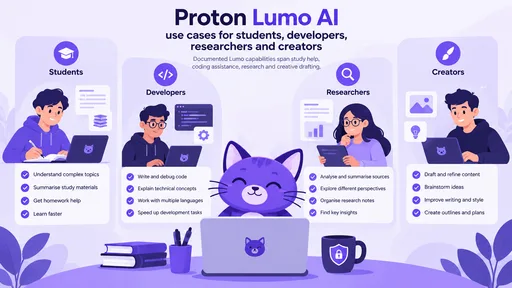
Students. Lecture summaries, concept explanations, revision material generation. Lumo’s document analysis plus disposable processing suits academic life, where you handle copyrighted readings and personal notes you did not choose to publish.
Developers. Debugging rubber-duck sessions, code explanation, architecture brainstorming. The 2026 model tiers include a heavier option for complex reasoning, and thinking-mode toggles let you spend effort where it counts. See the dedicated section below.
Researchers. Literature triage and web search without leaving a profile trail. Researchers working on politically sensitive topics get the anonymous-access angle outright.
Creators. Brainstorming, drafting, repurposing content across languages. If your creative work involves unpublished ideas you want to keep unpublished, a no-training policy is directly relevant. Creators juggling multiple content tools might also browse our guides on InVideo AI and Kling AI for the video side of their stack.
Privacy-conscious users. Obvious fit. Journalists, lawyers, researchers, and professionals whose work has specific data-handling requirements. Read our overview of the current field in latest AI models 2026 for the surrounding context.
Professionals. Contract review, client-facing drafts, internal documentation. The GDPR footing and European hosting matter for businesses with data-residency obligations.
People experimenting with AI. Guest mode is a low-friction way to try an AI assistant without creating an account. No signup friction, no trial countdown, just a chat box.
Who Might Prefer Another AI Assistant?
Honesty time. Lumo is not automatically the right choice, and pretending otherwise would make this guide useless.
If your workflow lives inside an IDE or depends on agentic coding pipelines, the ecosystems around the biggest assistants offer deeper tooling, and comparing options like ChatSonic versus ChatGPT or reviewing Xiaomi MiMo for code shows how specialized this space has become. If you need heavy multimodal work, meaning generation across images, audio and video natively in one flow, the major platforms currently go further, though dedicated creative tools like Tripo AI for 3D are worth a look too. If you want deep personalization that remembers everything about you across products, that is precisely the model Lumo declines to offer by design. Enterprise procurement teams may find richer administrative and compliance suites elsewhere, and companies exploring broader automation should also read our coverage of AI customer support deployments. None of this is criticism; it is just a different optimization target.
Lumo AI for Developers
Practical, privacy-aware coding help is one of Lumo’s quietly strong use cases, and it maps neatly onto the interests covered across RCN Guide’s developer content, such as the AI leadership and engineering explainers.
Debugging: paste an error plus the offending function and ask for likely causes. Because the session data is not retained, sharing code that touches production systems feels less reckless, though you should still sanitize anything genuinely sensitive.
Code explanation: inherited a codebase with zero comments? Ask for a walkthrough function by function.
Architecture brainstorming: describing trade-offs between approaches, sanity-checking database schemas, sketching API designs before committing.
Documentation and review: generating docstrings, drafting README sections, getting a second opinion on a pull request before a teammate sees it. For model-side context on how far code-specialized AI has come, readers can pair this with our Claude Opus 5 guide.
Learning programming: asking beginner questions without an account attached to them is genuinely nice when you are worried about looking silly. Everyone starts somewhere; Lumo just forgets you did.
Lumo AI for Students and Everyday Users
Semester reality: three deadlines, two group chats, one existential crisis. Here is where a private assistant slots in without becoming a procrastination multiplier.
Explaining difficult concepts: ask Lumo to explain a topic twice, once simply, once at exam level, then once more as if you were five. Iterating like this costs nothing and no session about your confusion persists.
Summarizing lecture notes: dump a wall of notes and ask for a structured revision sheet with key terms highlighted. Turning notes into flashcard formats works well too.
Brainstorming projects: essay angles, presentation hooks, thesis questions. Use AI for the idea generation and citations of your own thinking; that is legitimate work.
Checking writing: grammar, clarity, tone. Rewriting a first draft into something your professor will actually enjoy reading.
Understanding technical documentation: the unsung hero feature. Documentation is often written for people who already understand it. An assistant bridges that gap in plain language, and readers curious about how well different models parse dense text can see our Kimi AI guide for another take on long-document handling.
One line we will not blur: use Lumo to learn the material, not to replace learning it. Summarize the paper, then make sure you could defend the summary out loud. Universities are getting much better at noticing the difference.
Pro Tip
Guest mode plus web search is the perfect combo for curiosity sessions: current information, no residue. Signed-in mode plus encrypted history is better for ongoing projects where you actually want continuity across days. Matching the mode to the task is half the skill of using AI well.
Lumo AI Prompts You Can Actually Try
Copy, paste, adapt. Each one is built to produce something more useful than a generic answer.
- Study: “Explain the difference between TCP and UDP as if I have a networking exam tomorrow, then quiz me with five questions of increasing difficulty.”
- Summarization: “Here are my lecture notes. Turn them into a one-page revision sheet with key terms bolded and three likely exam questions at the end.”
- Coding: “This Python function raises IndexError intermittently. Walk through the likely causes in order of probability, then suggest the smallest fix.”
- Research: “Compare how the EU AI Act and existing US approaches regulate foundation models. Give me the strongest argument on each side, with the caveats.”
- Brainstorming: “I have 300 euros and two weeks off in October. Give me five trip concepts ranked by how different they are from a standard city break, then stress-test the top pick.”
- Writing: “Rewrite this paragraph in a warmer tone without making it longer. Then tell me what you removed and why.”
- Technical explanation: “Explain zero-access encryption versus end-to-end encryption using a physical-world analogy I could retell to my grandmother.”
- Document analysis: “Here is a rental contract. List every clause that differs from a standard fair rental agreement in plain language, flagging anything unusual.”
- Fact-checking: “Here are three claims from an article I read. For each, tell me what is established, what is contested, and what you simply cannot verify.”
- Decision help: “I am choosing between two laptops for computer science studies. Ask me five questions before recommending anything, then justify the recommendation against my answers.”
Lumo AI Pricing and Plans
Lumo has a free entry point, including guest access, while Proton also offers account-based and paid options with different limits and capabilities. Because plan names, quotas and included features can change, readers should check Proton’s current Lumo pricing page before making a purchasing decision.
| Access type | What it is for | Key consideration |
|---|---|---|
| Guest | Trying Lumo without an account | Session-based use without saved account history. |
| Free account | Regular personal use | Adds account-based features such as encrypted chat history, subject to current limits. |
| Paid / Plus | Higher-volume or more demanding use | Higher limits and additional capacity may apply. Check current Proton documentation for the exact package. |
Before You Subscribe
AI plans change quickly. Treat the table above as a product-structure overview rather than a permanent price sheet, and verify the current limits and pricing directly with Proton before paying.
Lumo AI Limitations You Should Know
Every honest review has this section. Lumo’s limitations fall into two buckets: limitations it shares with all AI assistants, and ones specific to its design.
Shared with the category: hallucination, meaning confident invention of facts, citations and code APIs that do not exist. Context windows are finite, so very long conversations degrade. Model knowledge has a cutoff date, hence optional web search. Outputs need verification before you rely on them, especially for medical, legal or financial decisions. Privacy, again, does not equal accuracy.
Specific to Lumo: guest mode has stricter rate limits and no persistence, which can bite mid-project. The model ecosystem, while multi-model, is not the sprawling frontier-model buffet of the largest platforms, so on some highly specialized tasks you may notice capability gaps. Feature availability changes, as it does everywhere in AI, so anything in this guide could shift after publication. And rate limiting exists on all tiers; heavy production workloads are simply not what a privacy chat assistant is for.
For how these constraints compare across the newest wave of models, our rundowns of GPT-5.6 Luna and Amazon Nova AI offer useful reference points on what state-of-the-art systems attempt.
Lumo AI Capability Map
A qualitative view of Lumo’s documented design priorities, not a performance benchmark.
| Area | Editorial assessment | What that means |
|---|---|---|
| Guest access | Core feature | You can start without creating an account. |
| Data retention | Privacy-focused | Proton documents ephemeral processing for chats and encrypted history for signed-in users. |
| Everyday chat and writing | General-purpose | Suitable for common assistant tasks. |
| Agentic / IDE workflows | More limited | Lumo is primarily a chat assistant rather than a dedicated coding agent. |
| Cross-product personalisation | More limited by design | Its privacy model places less emphasis on persistent personal profiling. |
Is Lumo AI Worth Trying in 2026?
No star ratings, just a decision framework that respects your priorities.
| If you care most about… | Then… |
|---|---|
| Not being profiled, logged or trained on | Lumo is explicitly designed around that priority |
| Trying AI with zero signup friction | Guest mode makes this trivial |
| Handling sensitive documents and questions | Disposable processing plus zero-access history fits well |
| Deep personalization and memory everywhere | Another assistant may fit better; Lumo treats that as a feature to avoid |
| IDE-integrated or agentic coding | Specialized developer tooling likely serves you better |
| Maximum frontier-model capability at all times | The largest platforms currently expose more raw horsepower |
| European hosting | Proton documents Lumo infrastructure in Europe |
The nuanced read: Lumo is most interesting right now not because it wins capability contests but because it proves privacy-preserving AI chat is commercially viable and pleasant to use. That pushes the whole industry, since every competitor now gets asked “why not?” more often. Even if you stay on your current assistant, Lumo existing makes your data situation better.
The Bottom Line
Proton Lumo AI earns attention in 2026 for a reason that has little to do with benchmark leaderboards. It demonstrates that the assistant experience everyone now relies on can be rebuilt around consent: no account if you do not want one, no logs if you do, no training on what you say, and code open enough that you do not have to take any of it on faith. Whether it replaces anything in your current rotation depends on what you type into your AI tabs. If your questions are casual and public, your existing setup is fine. If your questions involve your health, your money, your work or your creativity before it is ready for daylight, the calculus changes.
The practical next step costs nothing and takes thirty seconds: open Lumo in guest mode, ask it something you would hesitate to type anywhere else, and close the tab. Then decide, with full information, where your AI conversations deserve to live. Readers curious about how the broader assistant landscape is developing can continue with our guides on Mistral AI Vibe and Meituan LongCat.
Official Sources and Further Reading
The product and privacy claims in this guide should be checked against Proton’s current documentation because Lumo’s features and plans can change. Start with Proton Lumo and Proton’s official support and privacy documentation before relying on a specific feature, limit or plan detail.
Use the key points in this guide to understand the topic and make more informed decisions.

This guide is researched and edited using relevant documentation, reliable sources and publicly available information.
Was this guide helpful?
Your feedback helps us improve future guides.