
In this article
If you have worked with LLM-generated content, you will probably recognise the moment when a draft feels almost right but still reads like a machine wrote it. The sentences are grammatically flawless, yet the rhythm is slightly off. The transitions are predictable, the vocabulary is symmetrical, and the whole piece lacks the friction that comes from a human trying to explain something properly. This is not a failure of the model. It is a direct result of how large language models generate text.
In testing, one thing became obvious: raw AI output is rarely ready for publishing. The first draft might compile, but it still needs testing, refactoring and code review. Humanize Max AI fits into that gap. It doesn’t generate content; it adjusts phrasing, tone and sentence structure after an LLM has already produced a draft, so the output reads more naturally and is easier to edit by hand.
The real problem with raw AI writing
Large language models, including those covered in our guide to What Is Generative AI?, work by predicting the next token based on patterns learned from enormous text corpora. That process is powerful, but it leaves stylistic fingerprints: text that’s overly polished and structurally uniform, lists that land in threes, paragraphs that close with a tidy summary, and ideas hedged with stock phrases like “it is important to note” or “in today’s rapidly evolving landscape.”
The reason is simple enough: these models are trained to produce statistically probable sequences, so they drift toward the centre of the distribution. That centre is clear, grammatically correct, and predictable. If you’ve read an AI draft and felt something was missing, you were probably noticing the absence of personal judgement, uneven pacing, and the small imperfections that mark human writing.
For a developer or technical writer, this becomes a practical problem. You cannot ship documentation that sounds like it was auto-generated by a corporate template. Readers lose trust when the tone is too smooth. The same applies to blog posts, product descriptions, and even internal reports. That is where an AI humaniser can help, but only if it is used with clear expectations.
HumanizeMax AI
What is Humanize Max AI?
Humanize Max AI is an online tool designed to rewrite AI-generated text so that it sounds less machine-like. It takes a piece of text, analyses its sentence patterns, and produces a version with more varied rhythm, better natural flow, and fewer repetitive transitions. The tool is aimed at writers who already have a draft from an LLM and want to refine it before editing further.
Humanize Max AI sits between raw generation and human review in a workflow. It doesn’t create new ideas or verify facts; it works on the surface structure of the text, so a person still needs to check the output for accuracy and tone. That’s worth keeping in mind before you rely on it.
Why LLM output often sounds recognisably machine-generated
If you want to use an AI humaniser effectively, it helps to understand why machine text has a distinctive sound. The core reason is that language models optimise for plausibility, not for originality or personal voice. They are also influenced by the training data, which often includes a large volume of formal, polished writing from the web. This creates a style that is technically correct but rarely compelling.
Some common patterns include:
- Overuse of transitional phrases such as “furthermore”, “moreover”, and “in conclusion”.
- Symmetric sentence lengths that create a rhythmic but unnatural cadence.
- Generic adjectives and verbs that avoid commitment.
- Repetition of the same clause structure across paragraphs.
- A tendency to summarise every point, even when no summary is needed.
This is why a tool like Humanize Max AI can be valuable. It is designed to break those patterns by rewriting sentences, adjusting word choice, and introducing more natural variation. It works more like a style editor than a content generator. The underlying meaning should stay the same, but the surface texture changes enough to reduce the “AI feel”.
If you are new to how these systems work, our guides on What Is Artificial Intelligence? and Types of Artificial Intelligence Explained provide useful background. For a deeper technical view, What Is Machine Learning? and What is Deep Learning? cover the training process behind these models.
How HumanizeMax fits into a modern AI content pipeline
Think of it less as a magic button and more as a post-processing layer in a larger pipeline. A typical AI-assisted writing workflow might look like this:
Output
AI
Length Controls
Review
Content
The tool is only one step in that chain. After it runs, you still need to read the output carefully. Humanize Max AI can improve the phrasing, but it cannot tell you whether a technical fact is wrong, whether a code example is incorrect, or whether the argument actually makes sense. Those checks belong to the human editor.
From a developer’s perspective, this is similar to using a linter or a formatter. A linter does not write the code. It catches style issues and enforces consistency. After the linter runs, you still need to run tests, review the logic, and make sure the code does what it is supposed to do. Humanize Max AI plays a similar role for prose.
How the tool works
The exact implementation details are not publicly documented in depth, but the general approach is familiar to anyone who has worked with natural language processing. Humanize Max AI takes the input text, identifies patterns that are common in machine-generated writing, and then applies a series of rewriting strategies. These strategies include sentence splitting or merging, synonym replacement, passive-to-active voice conversion, and reordering of clauses.
What matters in practice is the output quality, not the internal algorithm. In testing, the tool produced text that was noticeably less repetitive than the raw LLM draft: sentence lengths varied more, and some of the generic transitions disappeared. The results weren’t perfect, though. Some technical phrases got altered slightly, which is why the term locking feature matters. More on that shortly.
For more context on how these models generate text, our Complete RAG Guide explains retrieval-augmented generation, which is often used alongside LLMs in content pipelines. If you are interested in the broader landscape of current models, take a look at Latest AI Models 2026.
Feature breakdown with practical examples
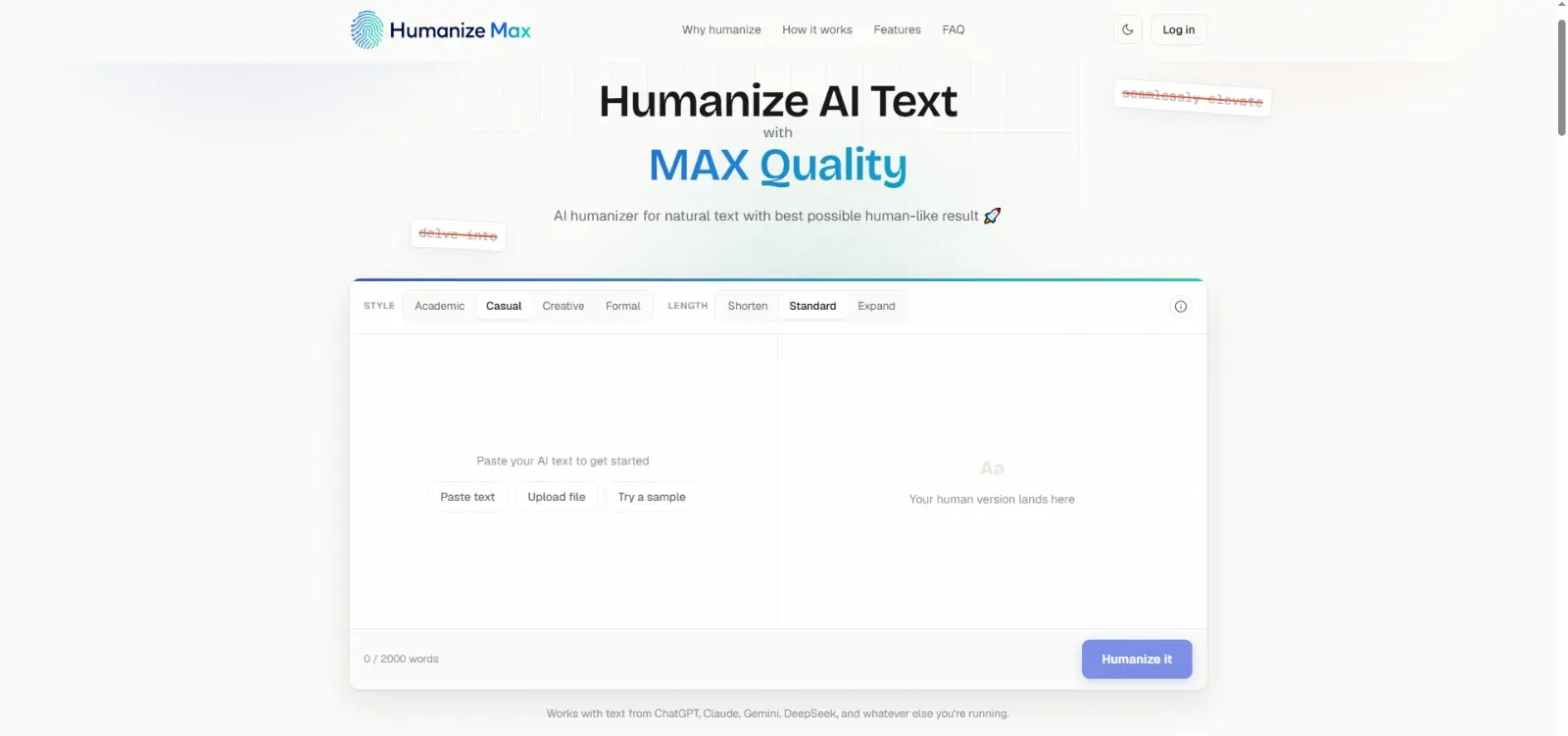
HumanizeMax AI includes several controls that change how the rewriting is applied. Some are straightforward, while others are more tailored to technical or SEO-focused writing.
Multiple Writing Styles
Choose from styles like casual, professional, academic, or marketing. A developer writing documentation might prefer a professional style, while a blogger may select a more conversational tone. This reduces the need to write separate prompts for different audiences.
Shorten, Standard and Expand Controls
Adjust the output length relative to the input. Shorten is useful for summaries or abstracts. Expand can add explanation, but it must be used carefully because the model may introduce filler or unsupported details. Standard preserves the original length.
Term Locking
This is one of the most useful features for technical writing. You can specify words or phrases that must not be changed during rewriting. API names, class names, product names, commands, function names and SEO keywords can all be protected.
Individual Line Rephrasing
Instead of rewriting the entire block, you can select individual lines or sentences and ask the tool to rephrase them. This gives you finer control and reduces the risk of unintended changes elsewhere in the document.
Multiple Reruns
Run the tool several times on the same text to generate different variations. The output is not deterministic, so each run can produce a slightly different result. This is helpful when you want to compare phrasing options before editing manually.
No-Signup Workflow
If the official website currently supports this, you can test the tool without creating an account. This lowers the barrier to evaluation and lets you quickly try it on a sample paragraph before committing to any plan.
Term locking and why developers should care
Term locking is the feature that sets Humanize Max AI apart from a generic paraphrase tool. If you write about code, APIs, or infrastructure, you know how easily a rewriter can mangle a technical term. Something like useState might become “use state”, RESTful API could become “restful application programming interface”, and a carefully named variable might be replaced with an approximation. That is a serious problem for documentation.
With term locking, you can specify a list of words or phrases that must appear exactly as written in the final output. The tool will then avoid changing those tokens during the rewriting process. This is particularly useful when you need to preserve:
- Function and class names
- Command-line arguments
- API endpoints
- Product or brand names
- SEO keywords
- Error messages
From a developer’s perspective, this turns Humanize Max AI into a safer post-processing step for technical content. You still need to verify the output, but you do not have to worry that every code token will be silently altered.
If you are working with machine learning models or LLM pipelines, our article on What Are AI Algorithms? offers a useful foundation. And if you want to understand how AI models are being used in real-world applications, check out Narrow AI vs AGI vs Superintelligence.
Testing an AI humaniser from a coder’s perspective
If I were evaluating Humanize Max AI for a production workflow, I would run a small set of tests. These are not benchmarks. They are practical checks that reveal how the tool behaves under realistic conditions.
Here is what I would test:
- Meaning preservation: Does the rewritten text still convey the same information? Any drift in semantics is a red flag.
- Technical terminology preservation: Are code identifiers, commands, and product names left unchanged? If not, term locking is mandatory.
- Sentence restructuring: Does the tool actually vary sentence length and structure, or does it just swap synonyms?
- Hallucination risk: Does the output introduce new facts, numbers, or claims that were not in the original? This is critical for documentation and SEO content.
- Tone consistency: Does the selected style remain consistent throughout the text, or does it drift between formal and casual?
- Keyword retention: For SEO-focused writing, are the target keywords preserved without awkward repetition?
- Code and command preservation: If a block contains inline code, does the tool treat it as protected by default, or does it try to rephrase it?
- Output reproducibility: If you run the same input twice, how different are the outputs? Some variation is fine, but too much inconsistency makes it hard to standardise.
- Context retention: Does the tool understand the surrounding context, or does it process sentences in isolation? This matters for longer documents.
These criteria are not unique to Humanize Max AI. They apply to any AI humaniser or paraphrase tool. The key point is that rewriting tools should not silently alter important technical information. If a tool cannot preserve meaning and terminology reliably, it is not suitable for technical workflows.
For a related discussion on how AI tools are evaluated in software development, our review of Xiaomi MiMo Code Review offers an example of looking beyond surface-level output. And if you are building a career around AI and DevOps, check Top DevOps Course & Certification Providers in 2026.
The workflow comparison table
To understand where Humanize Max AI fits, it helps to compare different content creation approaches. The table below reflects practical experience rather than lab-measured data.
| Workflow | Speed | Human Control | Consistency | Best Use |
|---|---|---|---|---|
| Raw AI Output | Very High | Low | Medium | Quick Drafting |
| Prompt-Only Editing | High | Medium | Medium | Prompt Refinement |
| AI Humaniser + Manual Review | Medium | High | High | Publishing Workflow |
| Fully Manual Writing | Low | Very High | Very High | Expert Content |
Practical workflow comparison, not a laboratory benchmark. Results will vary depending on the text, tool settings, and the writer’s own editing process.
The table shows that an AI humaniser plus manual review sits in the middle. It is faster than fully manual writing but still requires meaningful human involvement. That is the sweet spot for many teams: you get the speed of AI drafting with the quality control of human oversight.
Where HumanizeMax fits in the writing pipeline
The bar chart below shows the relative emphasis a writer might place on each stage when using HumanizeMax AI, as a rough illustration rather than measured data.
Where HumanizeMax Fits in an AI Writing Workflow
Illustrative workflow visualisation, not an independent benchmark.
Notice that HumanizeMax AI is not the final step. The final human review always gets full weight. The tool helps with tone adjustment and sentence variation, but the ultimate responsibility for quality rests with the person who reviews and publishes the content.
Humanize Max AI for bloggers and SEO professionals
For bloggers and SEO writers, the main benefit of an AI humaniser is breaking the repetitive patterns that make AI drafts feel generic. When you are producing a high volume of articles, it is easy to fall into the trap of using the same transitions and sentence shapes. Humanize Max AI can introduce variation without requiring you to manually rewrite every paragraph.
However, SEO writers need to be careful. An AI humaniser is not an SEO tool. It can help with readability, but it does not optimise headings, meta descriptions, or internal linking. Keyword placement still needs to be done manually or with a dedicated SEO tool. If you are interested in how AI supports broader business content strategies, our article on How AI Builds Business Credibility and Trust is worth reading. And for a view on AI in customer-facing content, see AI Customer Support: Benefits, Use Cases and Best Practices.
Humanize Max AI for technical documentation
Technical documentation is a special case. The writing must be clear, precise, and unambiguous, but it also needs to be readable. AI-generated documentation can be too dry or too verbose. A tool like Humanize Max AI can help by cutting unnecessary words and breaking long, complicated sentences into shorter ones.
That said, I would never run a full documentation page through an AI humaniser without first enabling term locking. Even then, I would review the output line by line. The risk of altering a parameter name, a CLI flag, or a subtle instruction is simply too high. The tool can improve style, but it cannot understand the technical consequences of a word change.
For more on how AI is being integrated into business and technical workflows, explore AI Leadership: How AI Is Transforming Decision-Making or How AI Is Changing the Future of Digital Business.
What AI humanisers cannot fix
An AI humaniser works on the surface of a text. It can change phrasing, vary sentence rhythm, and reduce repetition. It cannot add real-world experience, original expertise, accurate judgement, source verification, personal context, or editorial responsibility. Those things come from a human writer.
Consider a blog post about a complex technical topic. The humaniser can make the prose flow better, but if the underlying explanation is wrong, the output will be wrong in a more readable way. That is worse than a clunky but accurate draft. Always verify facts, check code examples, and ensure that the humaniser did not introduce subtle meaning shifts.
AI detectors are another area where caution is needed. Some users wonder whether an AI humaniser can guarantee that content will pass AI detection tools. The honest answer is no. AI detectors themselves are unreliable and produce inconsistent results. They can flag human-written text and miss AI-generated text. Using a humaniser does not change that fundamental uncertainty. If you are worried about detection, the best approach is to add genuine human input, not to rely on a rewriting tool. Our guide to What Is Machine Learning? explains why these detection systems are based on statistical patterns, which means they will never be perfectly accurate.
Pros and limitations
Here’s a practical summary of Humanize Max AI based on the features and workflow covered above, not a promotional list.
Pros
- Useful as a post-processing layer for raw LLM output
- Can reduce repetitive phrasing and generic transitions
- May improve readability and sentence rhythm
- Style options help match content to the intended audience
- Term protection can be valuable for technical content
- Multiple reruns allow comparison between variations
Limitations
- Cannot replace subject matter expertise
- May still require significant manual editing
- Important facts must be independently verified
- Technical terminology should be checked carefully
- AI detector scores should not be treated as proof of authorship
- Output can still contain awkward phrasing or unnatural word choices
Practical verdict
HumanizeMax AI is a practical tool for writers who already produce AI drafts and want to reduce the machine-like feel before editing. It fits neatly into a pipeline that includes an LLM for generation, a humaniser for style, and a human editor for verification. It is not a replacement for writing skill or domain knowledge.
The term locking feature is the standout for developers and technical writers. It addresses a real pain point: the tendency of paraphrase tools to mangle code and product names. The style and length controls are also useful for matching output to different content types. But the tool should always be treated as one step in a larger process, never as a final authoring solution.
If you are exploring AI tools for content creation, you may also want to read about Complete ChatGPT Guide and Claude AI Master Guide. For a broader view of the assistant landscape, our ChatGPT Guide for Beginners and Kimi AI: Complete Guide are good starting points. If you are curious about newer models, check out GPT-5.6 Luna AI: Complete 2026 Guide and Claude Opus 5: Complete 2026 Guide.
Final conclusion
HumanizeMax AI is a useful layer inside a broader content workflow. Run through it, a raw LLM draft sounds less machine-generated, which saves time during editing, and the term locking feature is especially useful for technical writers. But none of that replaces human judgement.
The workflow that holds up is the one described earlier: draft, humanise, fact-check, get expert input, edit manually, then publish. A rewriting tool can smooth out the phrasing, but it still can’t supply real-world experience, expertise, or editorial responsibility on its own.
If you treat HumanizeMax AI as a style formatter rather than a content author, it becomes a practical part of the modern AI writing stack. The key is to stay in control of the final output. No automated rewriter should ever have the last word on your content.
For those interested in contributing to RCN Guide or exploring sponsored content opportunities, visit our Technology Guest Posts & Sponsored Content page. If your niche is different, we also have Casino Guest Posts & Gambling Write for Us.
The best AI writing workflow still ends with a person: machine drafts, human refines, and publishes. HumanizeMax AI can help with the refining step, but it doesn’t replace it.
Use the key points in this guide to understand the topic and make more informed decisions.

This guide is researched and edited using relevant documentation, reliable sources and publicly available information.
Was this guide helpful?
Your feedback helps us improve future guides.